Klark John Cabungcal

Klark John Cabungcal

Automation Engineering Portfolio

End-to-end n8n, Make.com, and Zapier workflows that replace manual, repetitive business processes — from lead qualification to AI video publishing — with reliable, self-healing automation.

kj_klark@yahoo.com | klarkyy02@gmail.com | 500 Banay-Banay 1st, San Jose, Batangas | 0965 392 3930
Bachelor of Science in Information Technology
View My Work Book a Free Call

Click any project below to expand the full workflow

13
Projects documented
3
Platforms certified
2
Client projects delivered
6+
Years running live SCADA systems
n8n Make.com Zapier Anthropic Claude Gemini / Ollama AI Prompt Engineering REST APIs & Webhooks JSON / Data Parsing Google Workspace Slack / Gmail API Airtable · HubSpot HighLevel CRM SCADA Monitoring JavaScript n8n Make.com Zapier Anthropic Claude Gemini / Ollama AI Prompt Engineering REST APIs & Webhooks JSON / Data Parsing Google Workspace Slack / Gmail API Airtable · HubSpot HighLevel CRM SCADA Monitoring JavaScript n8n Make.com Zapier Anthropic Claude Gemini / Ollama AI Prompt Engineering REST APIs & Webhooks JSON / Data Parsing Google Workspace Slack / Gmail API Airtable · HubSpot HighLevel CRM SCADA Monitoring JavaScript

About Me

I'm Klark John Cabungcal, an automation engineer and technical operations specialist. For over 6 years, I've operated and maintained the SCADA-controlled Baggage Handling System at NAIA Terminal 3 — across four employers on the same critical infrastructure (BEUMER Group, MSV Construction, Xplore Phil. Inc., and currently Levlar) — monitoring sorter status, diagnosing conveyor and check-in faults, and keeping a real, high-stakes system running.

In parallel, I taught myself n8n, Make.com, and Zapier, got certified in all three, and started building AI-integrated automations that connect CRMs, forms, and messaging platforms into workflows that run unattended. I got into it because I kept noticing the same pattern in both worlds — industrial and digital — repetitive processes that break down when a human has to remember every step, and reliable systems when the process is built right the first time.

I'm currently open to freelance automation projects and full-time opportunities. If you have a repetitive process eating up your team's time, I'd like to hear about it.

How I Can Help

Common automations businesses need most — each adaptable to your specific process and tools.

Lead Response Automation

AI reads and scores inbound leads the moment they arrive, routes hot leads to your CRM instantly, and sends a reply before anyone else does.

EmailCRMAI Scoring

Booking & Scheduling Automation

Customers book real availability instantly through a form, no back-and-forth emails, with automatic confirmations or alternative time offers.

CalendarAI ExtractionForms

Invoice & Payment Follow-Up

Invoices get tracked automatically, reminders fire on schedule, and overdue notices only go out after a fresh payment status check.

OCRRemindersSheets

AI Customer Support Automation

AI reads, classifies, and drafts replies to support emails, flags anything sensitive for a human, and logs everything for tracking.

AI RepliesLoggingEscalation

Client Pipeline / Lightweight CRM

One spreadsheet becomes your control panel — update a status, and quoting, onboarding, and follow-up emails all fire automatically.

ZapierSheetsFollow-ups

Custom AI + API Integration

No native connector for a tool you rely on? I build direct API/webhook integrations with proper auth, retries, and error alerts.

APIsWebhooksAuth

AI Website Chat Assistant

A chat assistant that answers your visitors' questions 24/7 from your own business info, captures leads, and alerts you instantly. Try the one on this page.

Chat AILead CaptureSlack

Lead Generation & Cold Outreach

I find local businesses, audit their websites with AI, and send each one a personal email about its specific gap, with follow-ups, reply sorting, and opt-outs handled.

ProspectingAI AuditEmail
See a live demo →

Sales Call Tracking Dashboard

Every booked call and recording becomes live numbers (show rate, close rate, no-shows, setter performance) with zero manual entry.

CalendlyTranscriptsDashboard

Automation Care Plan

Monthly monitoring of your automations: error alerts, quick fixes, and small improvements, so nothing breaks silently.

MonitoringAlertsSupport

How We'd Work Together

A simple, predictable process from first message to a working automation.

1

Discovery Call

A short call (or async chat) to understand the manual process, where it breaks down, and what "done" actually looks like.

2

Proposal

A clear scope, timeline, and cost — no surprises, no vague "let's see how it goes." You know exactly what you're getting.

3

Build & Test

The automation gets built with error handling and edge cases in mind from day one, then tested against real scenarios before delivery.

4

Handoff & Support

You get documentation on how it works, and I stay available to fix anything that breaks or adjust as your process evolves.

Common Questions

Things people usually wonder before reaching out.

What if I don't know exactly what I need automated?

⌄
That's completely normal, and it's actually where most projects start. On our first call, I'll ask about your day-to-day workflow and point out the repetitive parts that are good automation candidates — you don't need to arrive with a technical spec.

How long does a typical project take?

⌄
It depends on scope, but most single-workflow automations (like lead routing, booking, or invoice follow-up) take about 1-2 weeks from kickoff to a tested, working system. I'll give you a specific timeline as part of the proposal, not a vague estimate.

What if something breaks after you're done?

⌄
Every automation I build includes error alerts, so if something fails, you (and I) find out immediately instead of silently. I stay available after handoff to fix issues or adjust the workflow as your process changes.

Do you work with businesses outside the Philippines?

⌄
Yes — all of my work is remote and platform-based (n8n, Make.com, Zapier all run in the cloud), so location isn't a barrier. I'm happy to adjust working hours to overlap with your team's timezone.

What if I already have an automation that's not working well?

⌄
I can review an existing workflow, find where it's breaking down or missing error handling, and either fix it or rebuild the parts that need it — you don't need to start from zero.

Certifications & Trainings

AI Automation with n8n

Technical Virtual Assistants PH
May 19, 2026

HighLevel CRM Full Training

Technical Virtual Assistants PH
June 1, 2026

No Code Automation with Make.com

Technical Virtual Assistants PH
April 22, 2026

No Code Automation with Zapier

Technical Virtual Assistants PH
April 15, 2026

Prompt Engineering Full Training

Technical Virtual Assistants PH
May 19, 2026

Technical Drafting NCII

All Business Computer Center Phils. Inc.
Sep 11 – Oct 7, 2019

Electrical Installation and Maintenance NCII

Concept Institute for Career Enhancement, Inc.
Jun 4 – Jul 10, 2019

What Clients Say

Real feedback from businesses I've built automations for.

"
[Placeholder — add a real quote here once you have one, e.g. what problem the automation solved for them and how it's helped since]
S
Sean
Willers Coaching — Sales Call Tracker Client
+ Add another testimonial once you have one from a client
n8n · Scheduling · AI Extraction

Advanced Appointment Setter

⌄

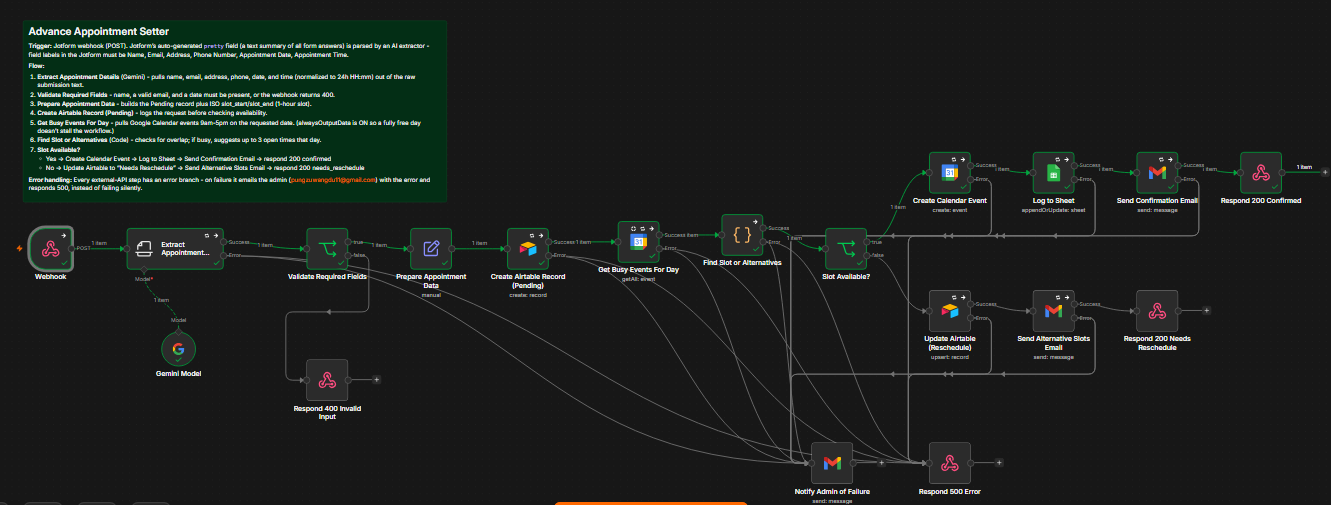
An AI-powered appointment booking assistant that takes a form submission (from Jotform) and fully automates checking availability, booking the calendar, logging records, and emailing the customer — with no human touching it unless something goes wrong.

  • 1. Trigger — Webhook: Jotform posts form submissions to this webhook, using Jotform's auto-generated plain-English summary of all form answers.
  • 2. Extract Appointment Details (Gemini AI): An AI "Information Extractor" reads that raw text and pulls out structured fields — name, email, address, phone, date, and time — auto-converting natural language like "2pm" into 24-hour format.
  • 3. Validate Required Fields: Checks that name, a valid email, and a date were actually extracted. If not, the customer gets an immediate error asking them to resubmit — no bad data enters the system.
  • 4. Prepare Appointment Data: Builds a clean record with a 1-hour time slot and marks status as "Pending."
  • 5. Create Airtable Record (Pending): Logs the request immediately, so there's a record even before availability is confirmed.
  • 6. Check Google Calendar availability: Pulls all events for that business day (9am–5pm) and checks for overlaps with the requested slot.
  • 7. Branch — Is the slot available? Yes → creates the calendar event, logs to Sheets, emails a confirmation, returns 200. No → marks "Needs Reschedule," emails up to 3 alternative times, returns 200 needs_reschedule.
  • 8. Error handling: Every external step has a fallback — failures email the admin directly and return a 500, so nothing fails silently.
  • Zero manual scheduling work — a lead fills out a form and either gets booked or gets alternatives, instantly, 24/7
  • No double-booking — actively checks the calendar before confirming
  • Full audit trail — every request lands in Airtable, successful bookings also land in a Google Sheet
  • Graceful degradation — bad input is rejected politely; system failures alert the admin directly instead of losing the customer's request
n8nGemini AIJotform Google CalendarAirtableGoogle SheetsGmail
n8n · E-Commerce · Fulfillment

E-Commerce Order Processing

⌄

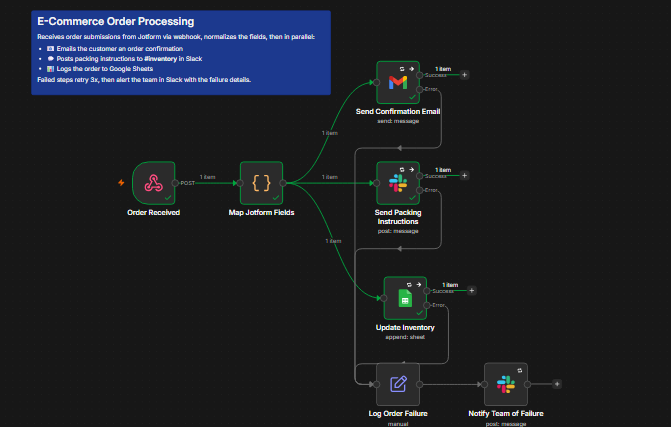
Triggered by a webhook, then fans out to three parallel actions — notifying the customer, the fulfillment team, and inventory tracking simultaneously instead of one after another.

  • Trigger — Order Received (Webhook): Listens for POST requests at /order-received — where a Jotform submission gets sent via Jotform's webhook integration.
  • Map Jotform Fields (Code node): Jotform's payloads are messy — field names vary depending on how the form was built, and Jotform also sends a "pretty string" fallback. This node normalizes everything into a clean object: customer name, email, order ID, items, total, and shipping address.
  • Fan-out to three parallel branches:
  • → Send Confirmation Email (Gmail): Sends an HTML order-confirmation email with order ID, items, and total.
  • → Send Packing Instructions (Slack → #inventory): Posts order details plus a packing checklist for the fulfillment team.
  • → Update Inventory (Google Sheets → append): Logs the order as a new row in the tracking spreadsheet.
  • Handles inconsistent Jotform field naming with a resilient lookup + "pretty string" fallback
  • Three actions fire in parallel instead of a slow sequential chain
  • Retries 3x on every external call before escalating to a Slack failure alert
n8nJotformGmail SlackGoogle Sheets
n8n · Finance · Collections

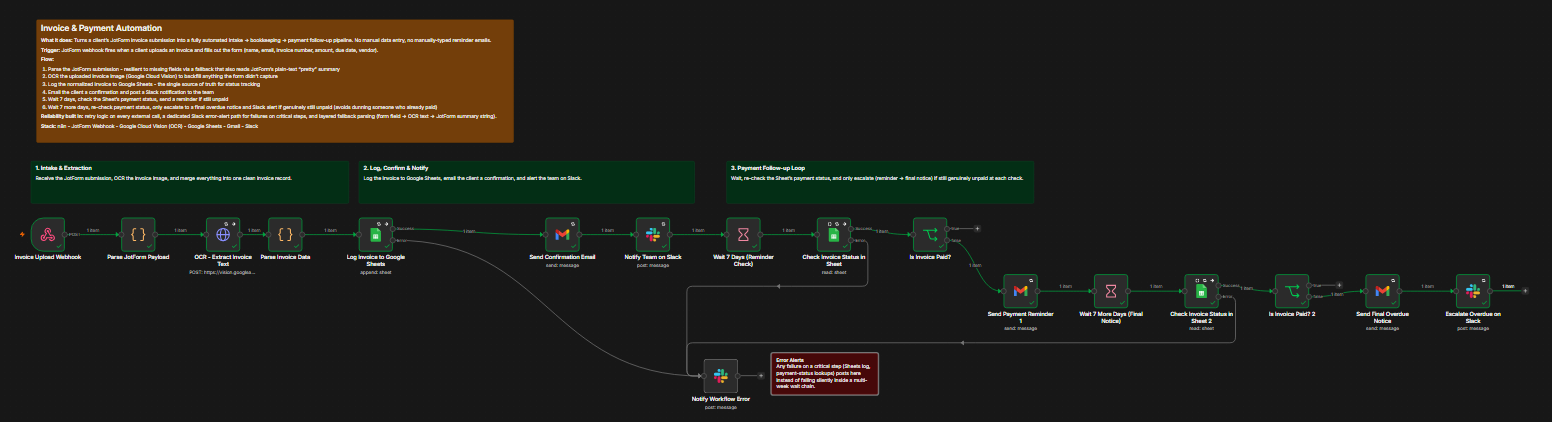
Invoice & Payment Automation

⌄

Manual invoice intake and collections follow-up is a classic small-business time sink. This workflow replaces that entire chain end to end.

Freelancers, small agencies, or an accounts-payable/receivable function at a small company — anyone processing a steady trickle of invoices without a full accounting department behind them.

Manual taskAutomated by
Opening the invoice, reading it, typing details into a spreadsheetJotForm intake + OCR cross-check + auto-logging
Emailing the client "we got it"Confirmation email node
Telling the team a new invoice came inSlack notification
Remembering to check back in a weekWait node + scheduled re-check
Writing (and remembering to send) a reminderAuto-generated reminder email
Checking again before escalatingSecond payment re-check before final notice
Flagging genuinely overdue invoices to a humanSlack escalation alert
  • Time saved per invoice: even a conservative 5–10 minutes of manual entry plus follow-up overhead adds up fast — this turns that into a one-time setup cost
  • Faster cash collection: reminders go out exactly on schedule, every time
  • Fewer errors: OCR cross-checking catches mismatches, and a payment re-check before escalation avoids dunning someone who already paid
  • Scales without added headcount: processing invoice #50 costs the same as invoice #1
n8nJotformGoogle Cloud Vision (OCR) Google SheetsGmailSlack
n8n · Sales · AI Qualification

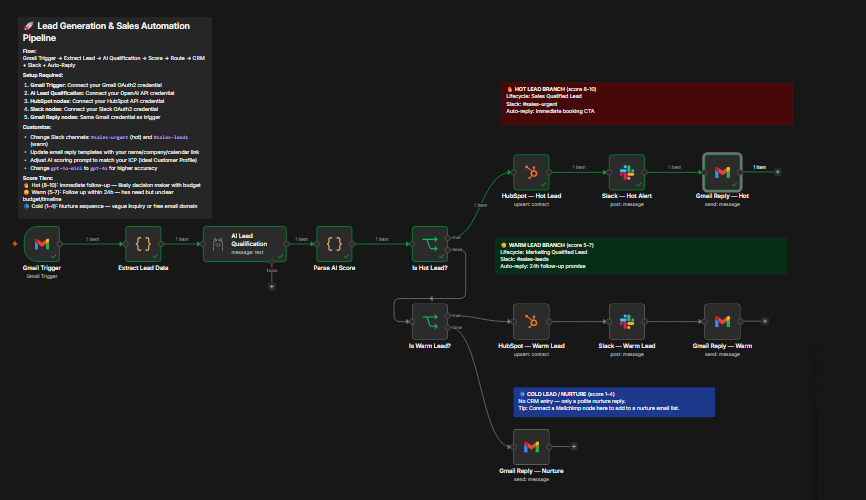
Lead Generation & Sales Automation Pipeline

⌄

Built a fully automated inbound lead scoring system using n8n that processes every new email, qualifies it with a local AI model, and triggers the right sales actions — all without manual review.

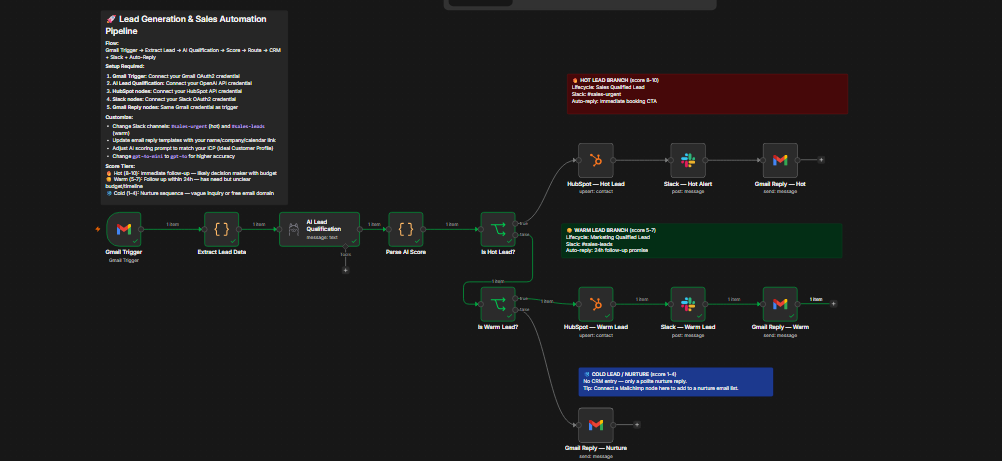
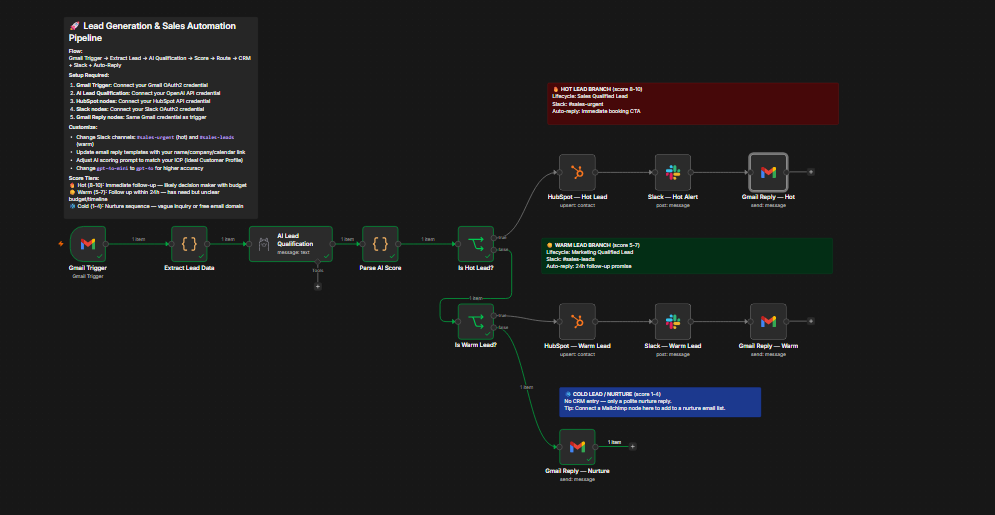
Monitors a Gmail inbox, extracts lead intelligence, runs it through a locally-hosted Llama 3.2 model via Ollama using BANT qualification criteria, assigns a score (1–10) and tier (hot/warm/cold), then automatically creates contacts in HubSpot, sends Slack alerts to the sales team, and dispatches personalized email replies — all within seconds.

📧 Gmail Trigger→ 🧠 Extract Lead Data→ 🦙 AI Qualification (Ollama / Llama 3.2)→ 📊 Score & Tier
🔥 Hot (8–10) HubSpot: SQLSlack #sales-urgentBook-a-call reply
☀️ Warm (5–7) HubSpot: MQLSlack #sales-leads24h follow-up reply
❄️ Cold (1–4) No CRM entry — polite nurture reply only
  • Zero cloud AI cost — runs entirely on local hardware via Ollama
  • BANT-based scoring prompt evaluates budget signals, decision-maker indicators, urgency, and domain type
  • Three-tier routing eliminates manual triage for the sales team
  • Auto-replies personalized per tier with appropriate CTAs
n8nOllama (Llama 3.2)Gmail API HubSpot CRMSlackJavaScript
n8n · Media · AI Video

Veo AI Video Generator — Auto-Post to YouTube & Facebook

⌄

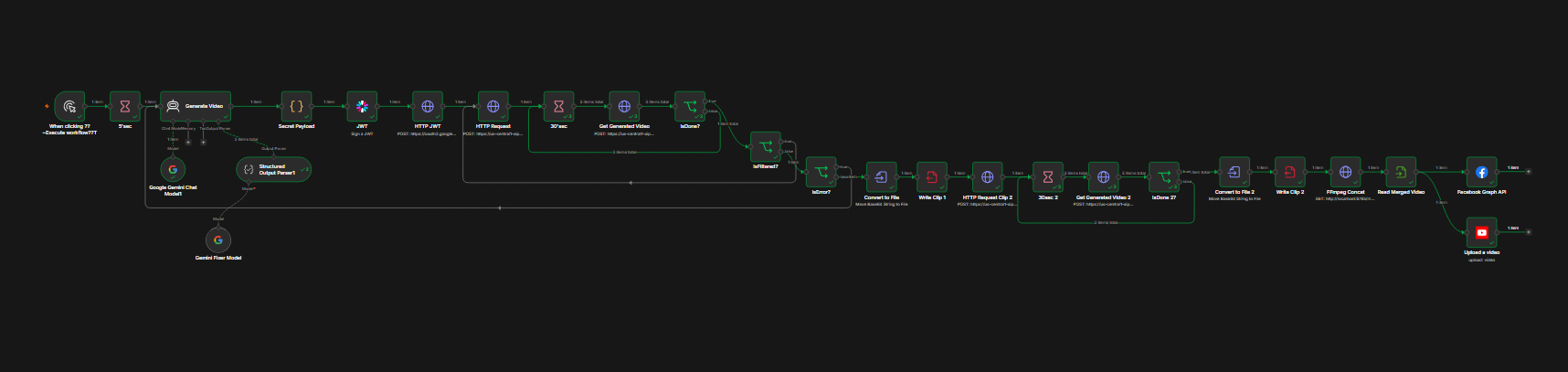
One click. Two AI videos. Posted everywhere. Automatically. This fully automated system uses Google Veo 3.1 AI to create short videos from scratch — then instantly publishes them to YouTube and Facebook at the same time.

🖱 Manual Trigger→ 🤖 Gemini writes scripts + titles→ 🔐 JWT / Service Account Auth→ 🎥 Veo 3.1: Generate Clip 1→ ⏳ Poll every 30s
🎥 Veo 3.1: Generate Clip 2→ ⏳ Poll every 30s→ 🎞 FFmpeg Merge→ 📤 YouTube Upload 📤 Facebook Graph API
🚧 Content Filtered / Error→ Auto-regenerate script & retry
FeatureDetails
🧠 AI Script WriterGemini 2.5 Flash writes optimized prompts & titles
🎬 Dual Clip Generation2 unique 8-second vertical clips (9:16 reels format)
🔊 AI Audio IncludedVideos come with generated audio — no editing needed
🔄 Smart Retry SystemAuto-retries if AI filters or rejects content
📱 Reels-Ready FormatVertical 1080×1920
🚀 Dual PublishingPosts to YouTube + Facebook in the same moment
  • 0:00 — Workflow starts
  • 0:05 — Gemini writes scripts & titles
  • 0:30–2:00 — Veo generates Clip 1
  • 2:30–4:00 — Veo generates Clip 2
  • 4:05 — Clips merged into final video
  • 4:10 — Published to YouTube + Facebook

Total time: ~4–5 minutes from click to live post.

  • Automatically retries if Google's AI safety filter blocks content
  • Automatically regenerates scripts if video generation fails
  • Polls every 30 seconds to check video status
n8nGoogle Veo 3.1Gemini 2.5 Flash FFmpegYouTube APIFacebook Graph API
Make.com · Sales · AI Qualification

Lead Capture & AI Qualification — Gmail → Google Sheets

⌄

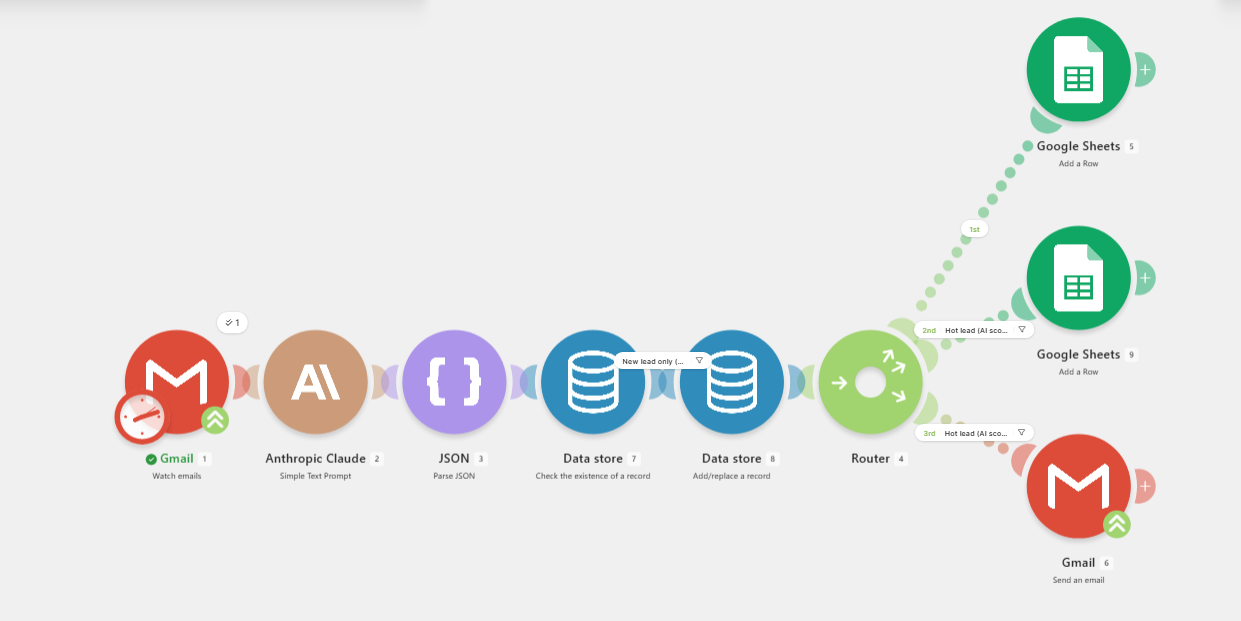
Inbound leads arrive by email — contact-form notifications, quote requests, general enquiries. This automation captures every qualifying email, de-duplicates it, uses AI to score and enrich it, logs it to structured sheets, escalates the hottest leads, and auto-replies — with zero manual triage.

  • 1. Watch emails (Gmail trigger): Polls the inbox on a 15-minute schedule, marking fetched messages as read so they're never processed twice.
  • 2. AI qualification (Claude via Make AI): Each email is passed to Claude Haiku 4.5, returning a JSON object — company, phone, category, urgency, a 0–100 lead score, and a summary.
  • 3. Parse JSON: The AI's response is parsed into individual fields.
  • 4. Check Data Store (de-duplication): The sender's email is looked up in a "Known Leads" data store — if seen before, the flow stops.
  • 5. Record in Data Store: New senders are recorded for future recognition.
  • 6. Router: Fans the flow into three independent branches.
  • 7. Log all leads (Google Sheets): Every new lead is appended to the main "Leads" sheet.
  • 8. Escalate hot leads (Google Sheets): Score ≥ 70 also goes to a "Hot Leads" priority sheet.
  • 9. Smart auto-reply (Gmail): Hot leads receive an immediate, prioritized acknowledgement.
Make.comAnthropic ClaudeGmail Google SheetsData StoresRouter
Make.com · Customer Support · Growth

Fearless — Customer Support & Growth Automation

⌄

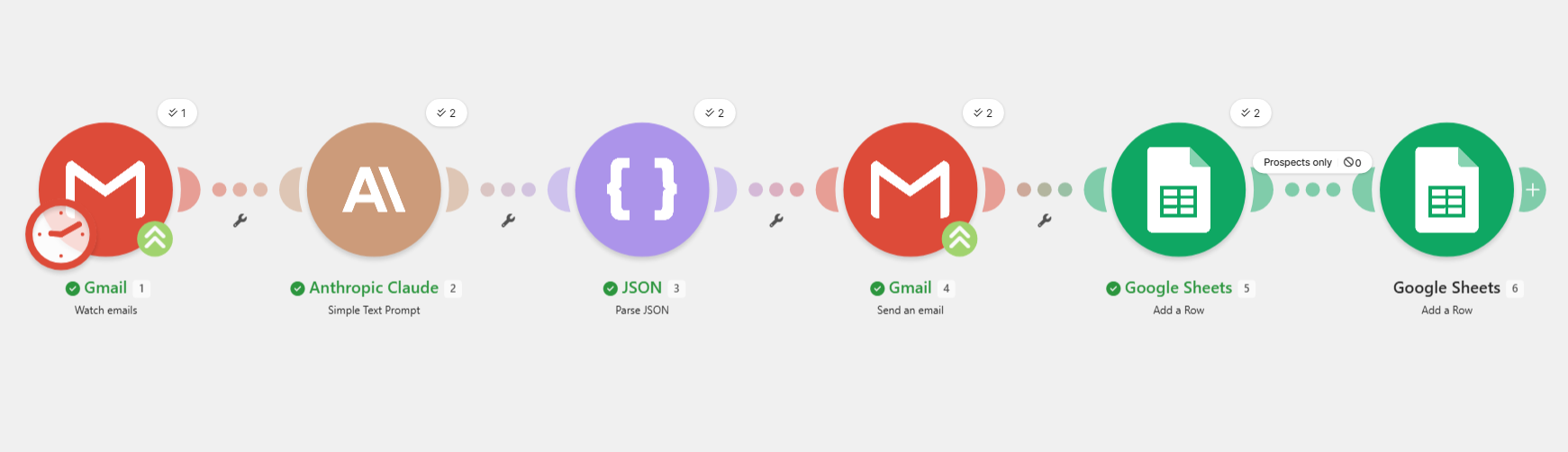
An automated Make.com worker that watches a customer support inbox and handles incoming emails without manual effort — reading, replying, and logging every message, while the same reply also does light, on-brand selling.

StepWhat happens
1. Watch inboxScans the Primary inbox for customer-type emails. Picks up to two new messages per cycle.
2. AI reads & writesClaude classifies the email, reads sentiment, writes a warm on-brand reply, and decides which offer to attach.
3. Auto-replyThe reply is emailed straight back automatically — usually within minutes.
4. Log everythingCustomer, request, sentiment, and reply are recorded to a Support Log spreadsheet.
5. Capture leadsPotential buyers are added to a Leads & Prospects sheet for follow-up.
  • Curious shopper → answered warmly, plus a first-order discount code. Logged as a lead.
  • Happy customer → thanked, asked for a review, given a referral code.
  • Upset customer → sincere apology, flagged for human follow-up, offered a win-back discount.
  • Speed and coverage: friendly, on-brand answers within minutes, day or night
  • Growth, not just maintenance: every email becomes a small revenue lever
  • A compounding asset: Leads sheet builds an outreach list, Support Log surfaces recurring issues
  • Built-in safeguard: complaints are flagged "needs human," AI never invents refunds or firm promises
Make.comAnthropic ClaudeGmail Google Sheets
Zapier · CRM · Client Management

Client Pipeline Automation

⌄

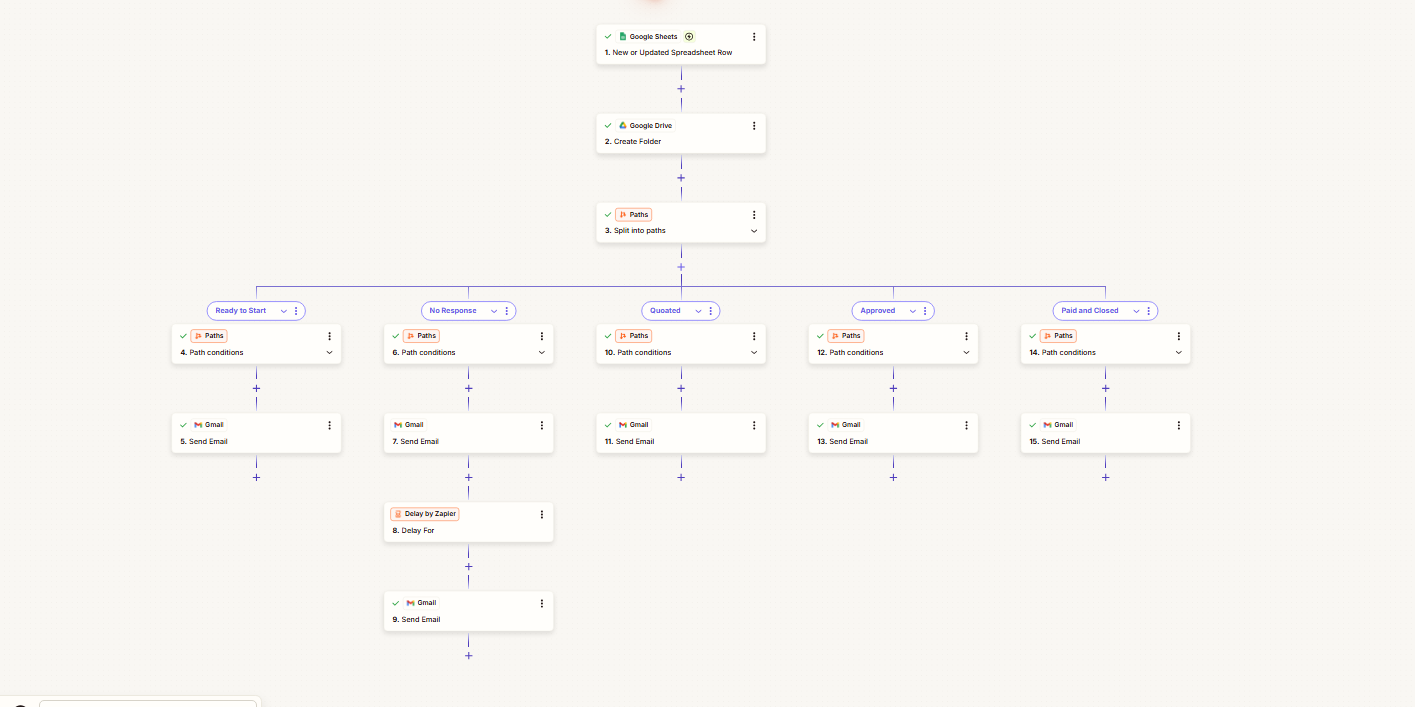
A lightweight CRM plus a sales-and-delivery assistant, built entirely around a single spreadsheet. Updating a single Status dropdown triggers the entire next step automatically — no Gmail, no Drive, no copy-pasting emails.

  • 1. Trigger — New or Updated Spreadsheet Row (Google Sheets): Fires whenever a client row is added or its Status is changed.
  • 2. Create Folder (Google Drive): A folder named after the client and project is created automatically on each run.
  • 3. Split into Paths (Zapier Paths): The Status value routes the row down one of five branches.
  • → Ready to Start: Sends a kickoff email.
  • → No Response: Sends a check-in, waits 3 days, then auto-sends a follow-up.
  • → Quoted: Sends the exact quote amount pulled from the sheet.
  • → Approved: Sends a confirmation email.
  • → Paid and Closed: Sends a thank-you email.
  • No lead goes cold — most quotes die simply because nobody followed up
  • Every client gets a fast, consistent, professional response at each stage
  • Quoting, onboarding, and closing become one-click actions on a spreadsheet
  • Scales cheaply — the workload of writing status emails stays at zero
ZapierZapier PathsGoogle Sheets Google DriveGmailDelay by Zapier
n8n · Sales Analytics · Dashboard ✓ Real Client Project

Automated Sales Call Tracker & Dashboard

⌄

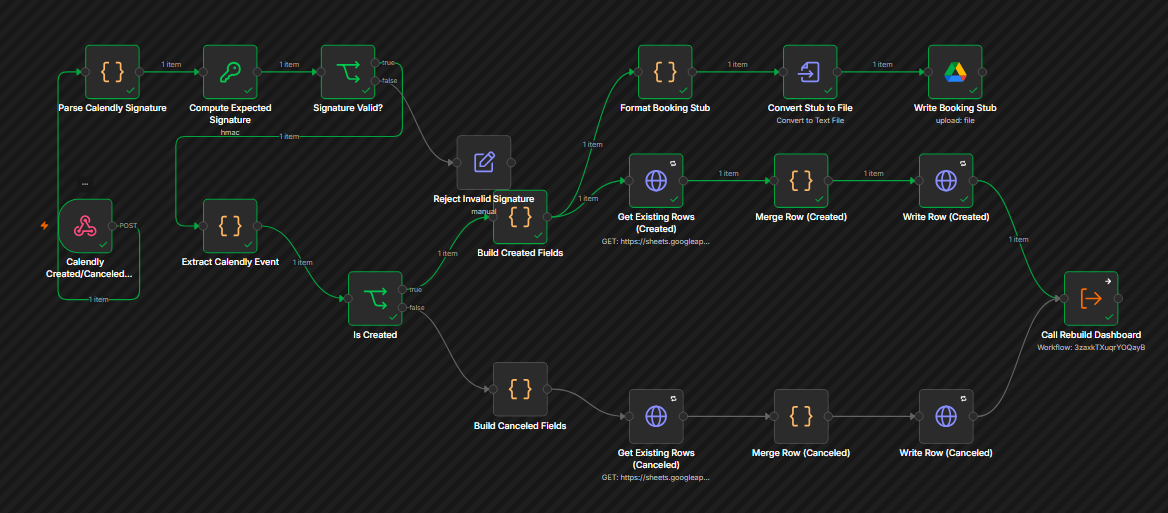
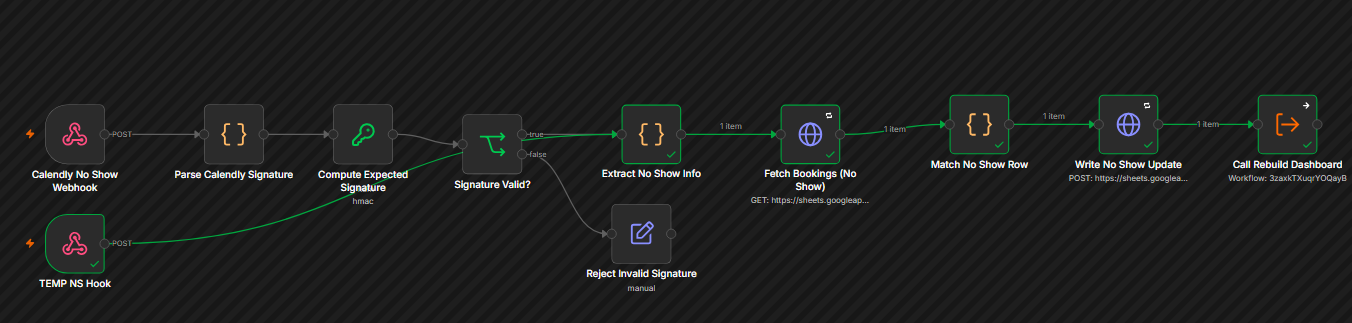
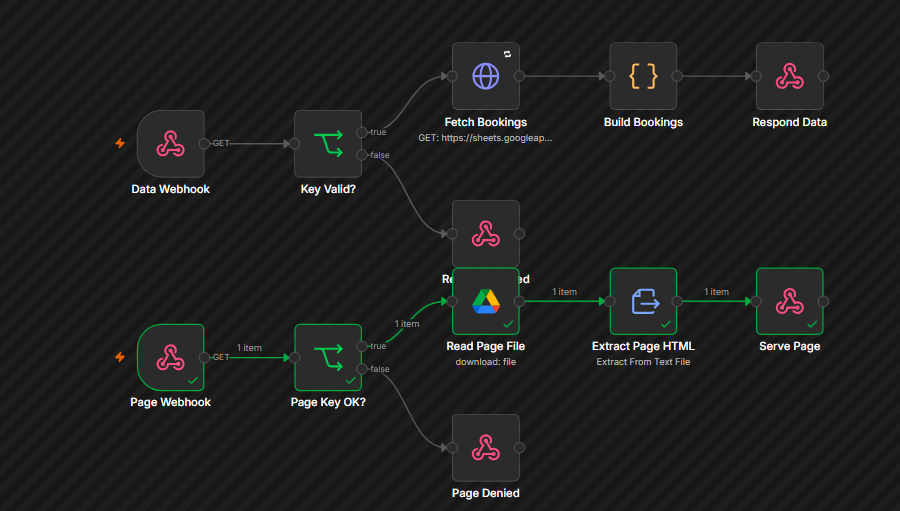
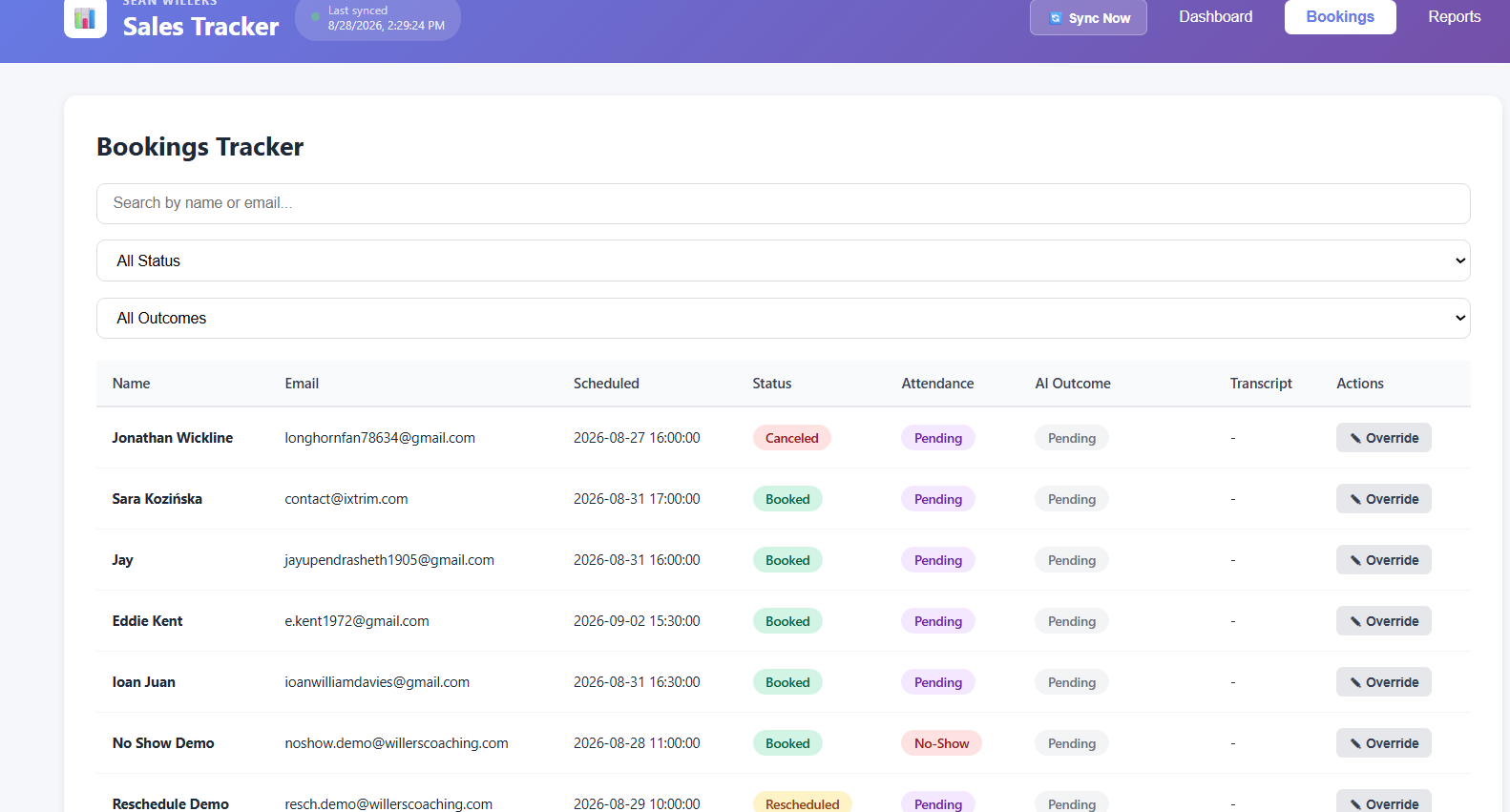
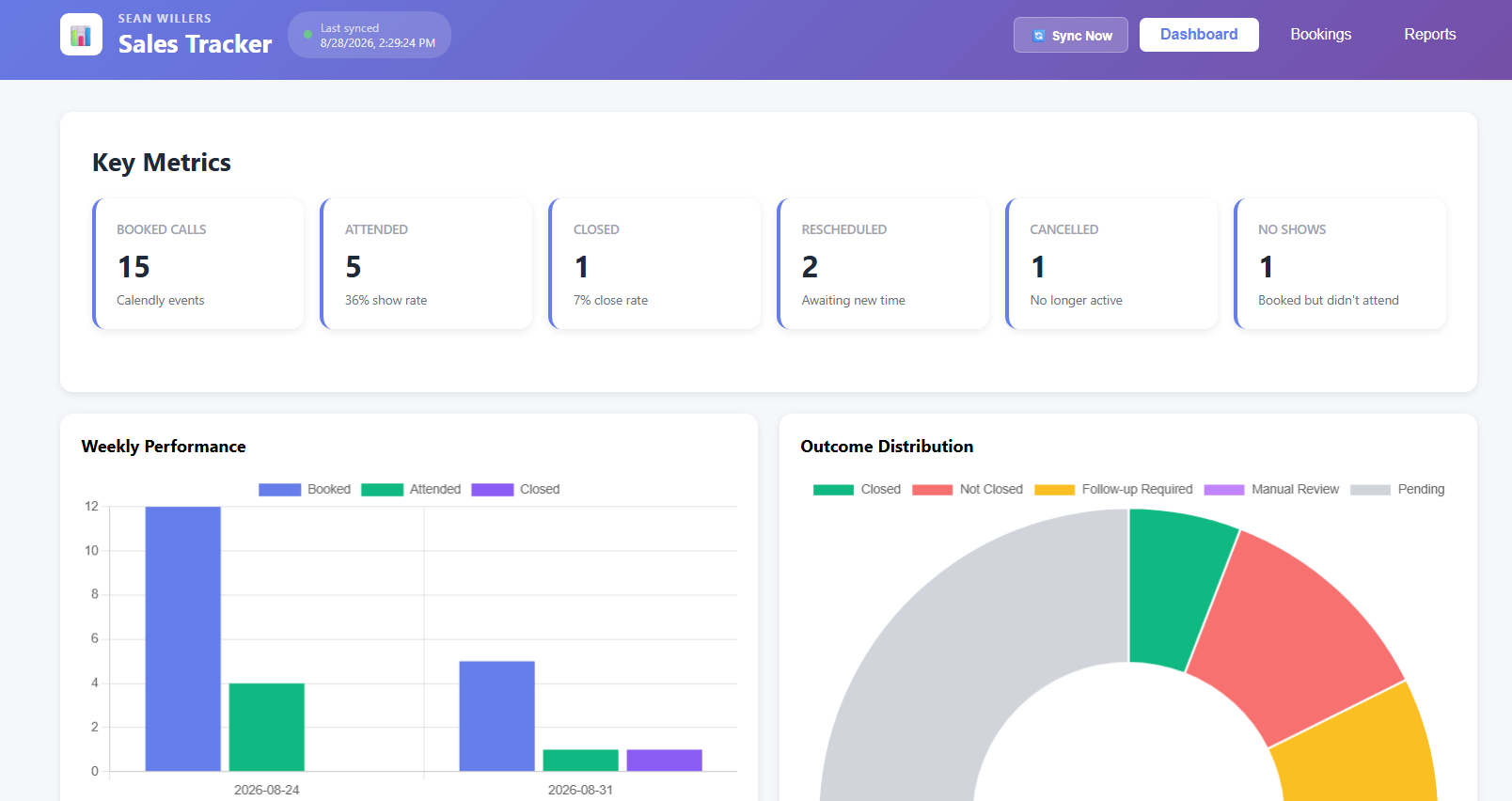
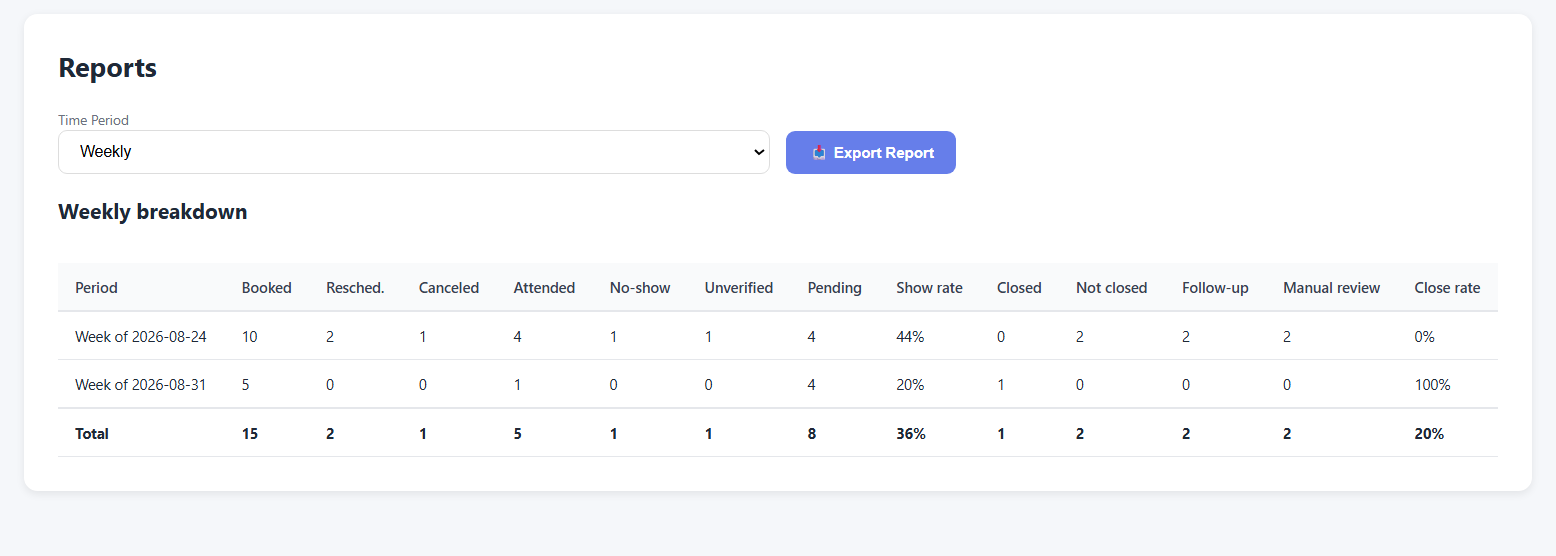
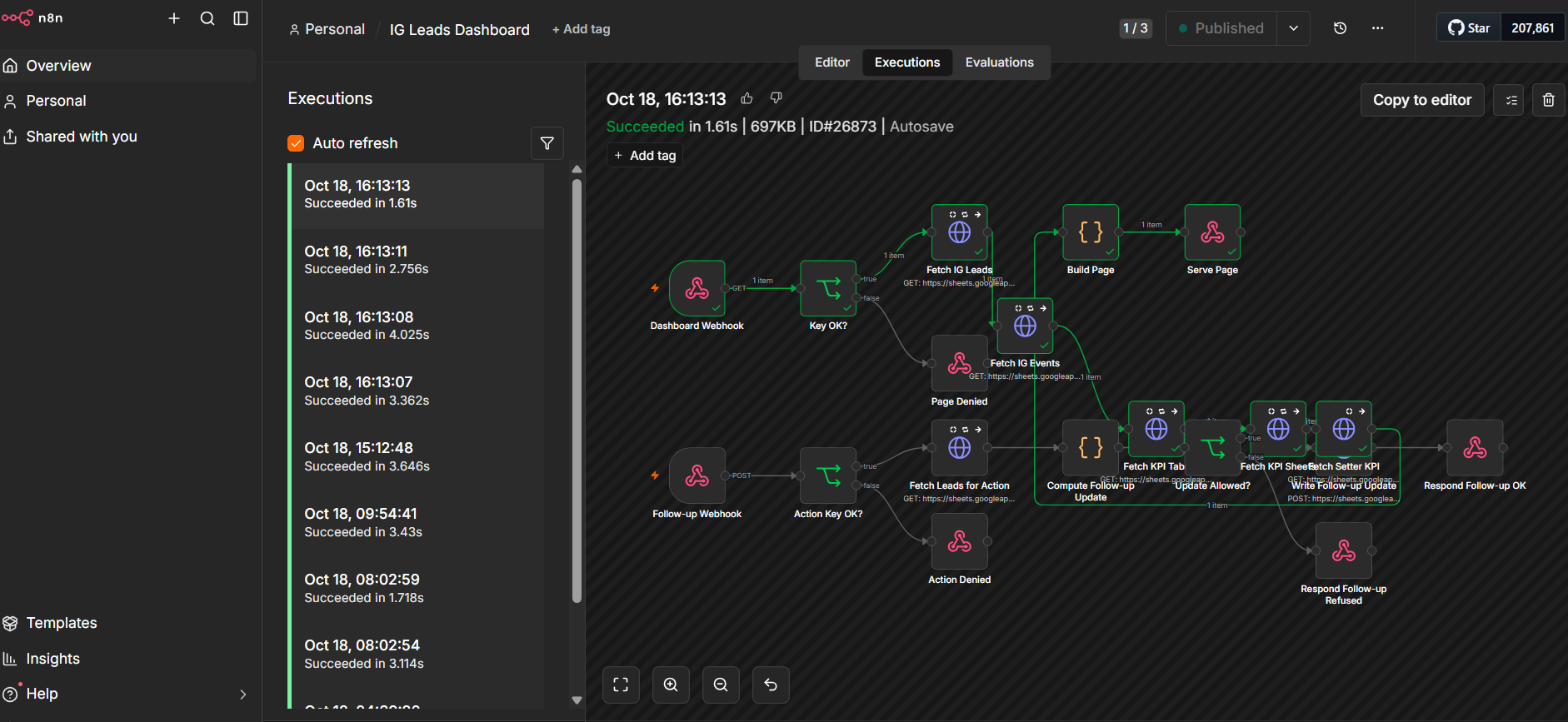
A production automation built for a real client (Willers Coaching) — an automated pipeline that turns every sales call into structured data with zero manual entry, and shows it on a live dashboard. Built entirely in n8n, wired to Calendly, Google Sheets/Drive/Meet, and Gemini AI. It solves a simple but common problem: coaches book discovery calls, run them, and rarely log consistently afterward — did they show up, did they buy, what's next — so there's no reliable view of booking volume, show rate, or close rate. This system logs all of that automatically from the call itself.

  • Booking: A prospect books a call in Calendly. Calendly fires a signed webhook to n8n, which creates a row in the "Bookings" Google Sheet — name, email, event type, scheduled time, status Booked.
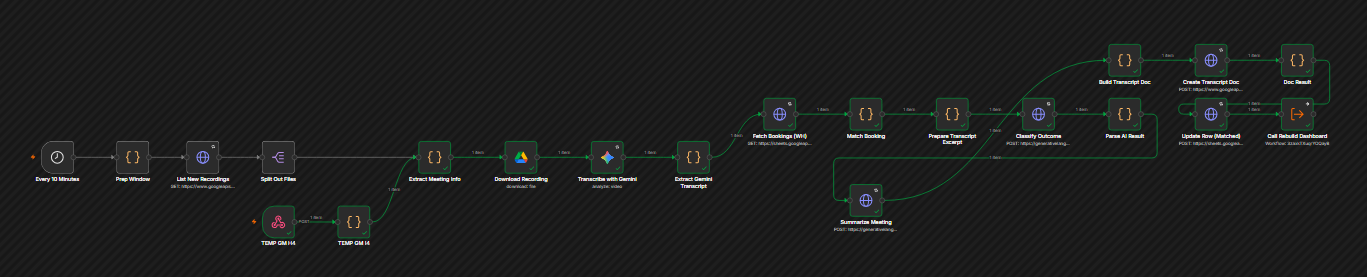
  • The call: Runs on Google Meet, which saves the recording to a Drive folder automatically.
  • Transcription: Every 10 minutes, n8n checks that folder. When it finds a new recording, it sends the video to Gemini, which transcribes the full conversation.
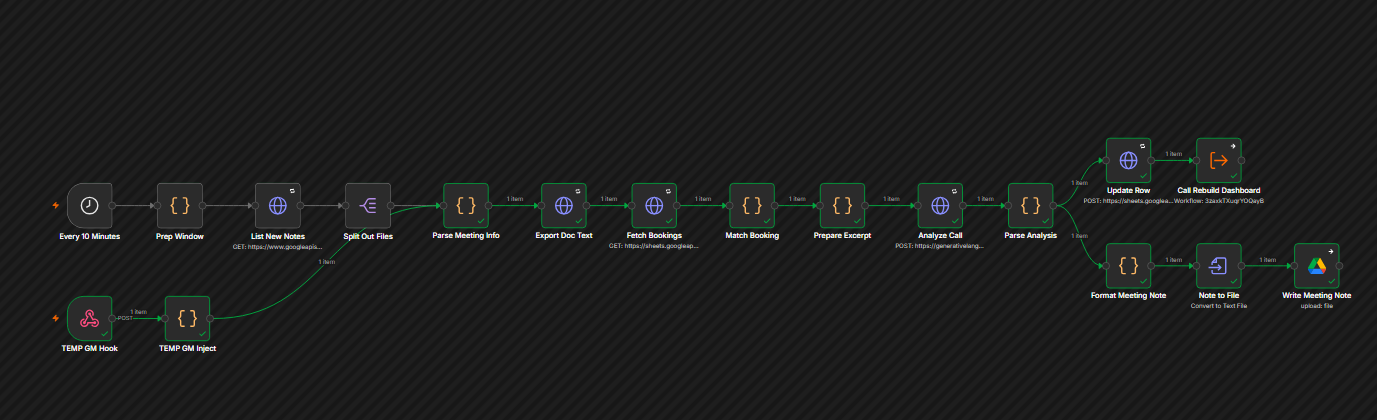
  • Analysis: The transcript is matched back to the right booking row (by name + time), then Gemini classifies two things — attendance (Yes / No / Unverified, where Unverified means the transcript was too thin to tell rather than being guessed as a no-show), and outcome (Closed / Not Closed / Follow-up Required / Manual Review).
  • Notes document: A formatted Google Doc is generated — summary, next steps, key details, and the full transcript — with a link added to the sheet row.
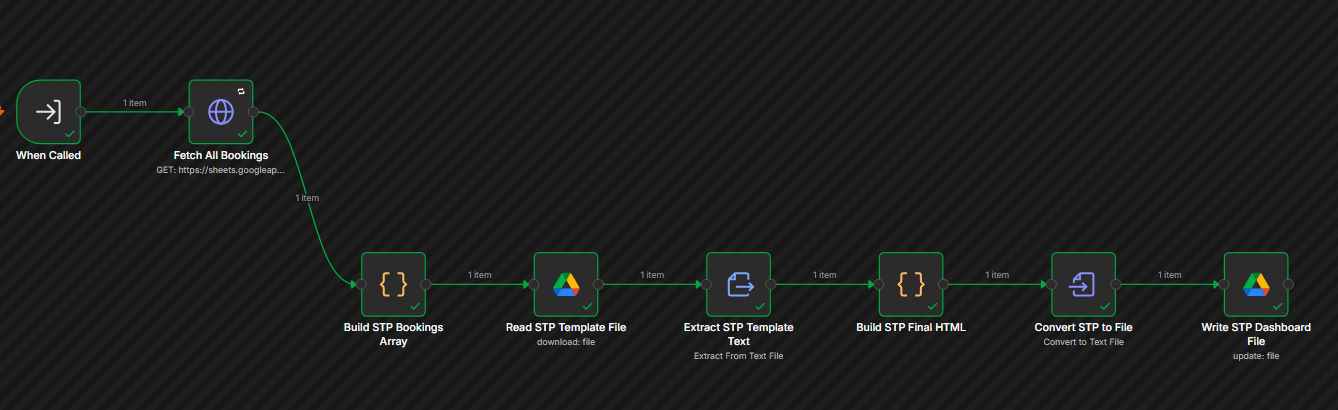
  • Dashboard: The row updates and the dashboard rebuilds automatically, so booked/attended/closed counts, show rate, close rate, and weekly/monthly breakdowns are always current.
  • No-show sync: If Calendly marks a no-show, that flows to the row automatically.
  • Reschedule handling: A moved call keeps both rows (original marked Rescheduled, new one linked to it) so history stays visible, but it's only counted once.
  • Grace Period Check: A safety net — any call that came and went with no transcript after 24 hours gets flagged Manual Review instead of sitting forgotten.
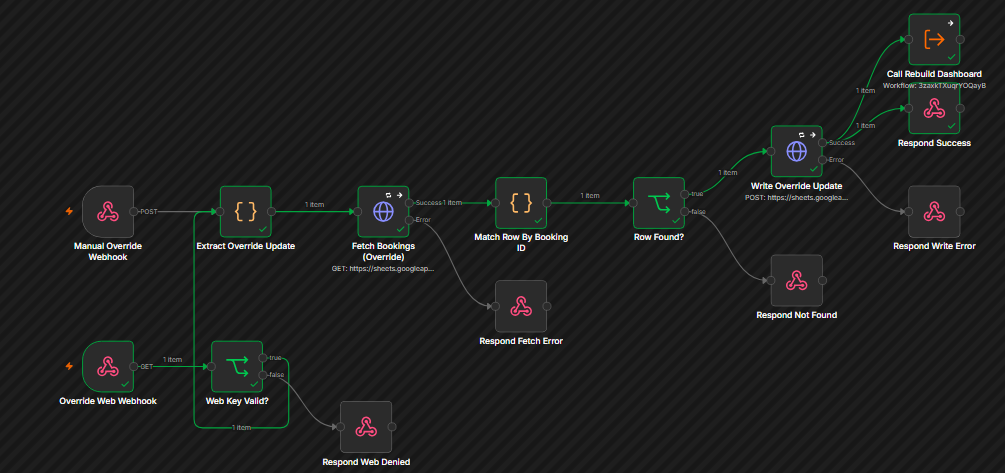
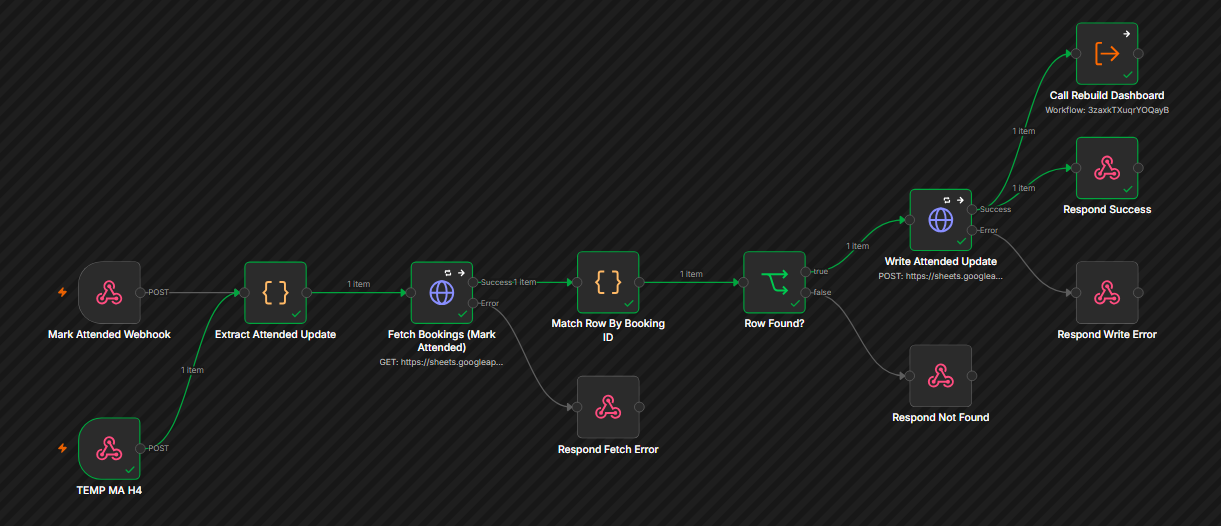
  • Manual controls: Two small endpoints (or direct sheet editing) let a human override attendance or outcome for anything the AI couldn't resolve.
  • Error handler: Any workflow failure logs to a sheet and emails the client directly.
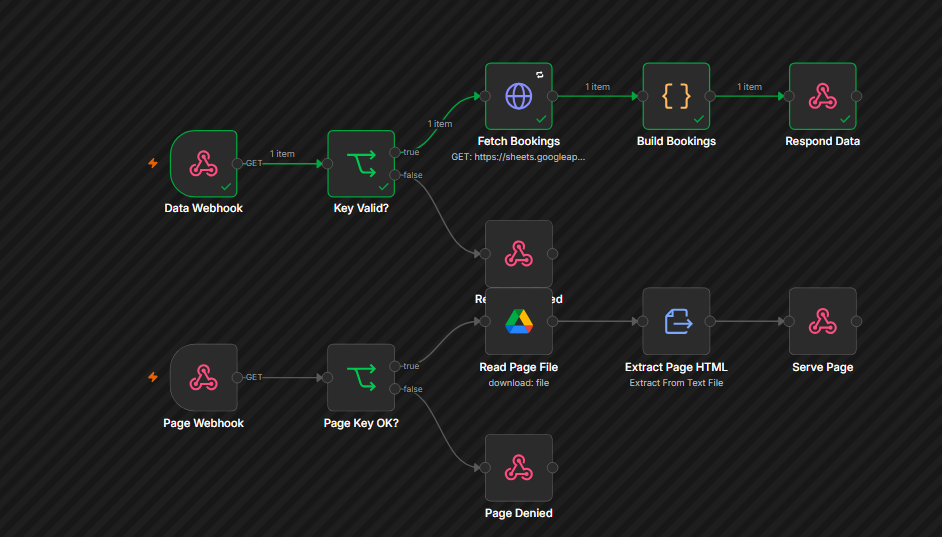
  • Dashboard access: A single key-gated URL that opens in any browser and reads live from the sheet.

This isn't one large workflow — it's roughly 10 small, single-purpose workflows (Calendly Booking Sync, Interview Pipeline, Grace Period Check, Rebuild Dashboard, the two APIs, and others), all reading and writing the same Google Sheet as the single source of truth.

n8nCalendly APIGoogle Meet / Drive Gemini AIGoogle SheetsGoogle Docs
n8n · AI Agent · Job Search

Job Optimizer Agent

⌄

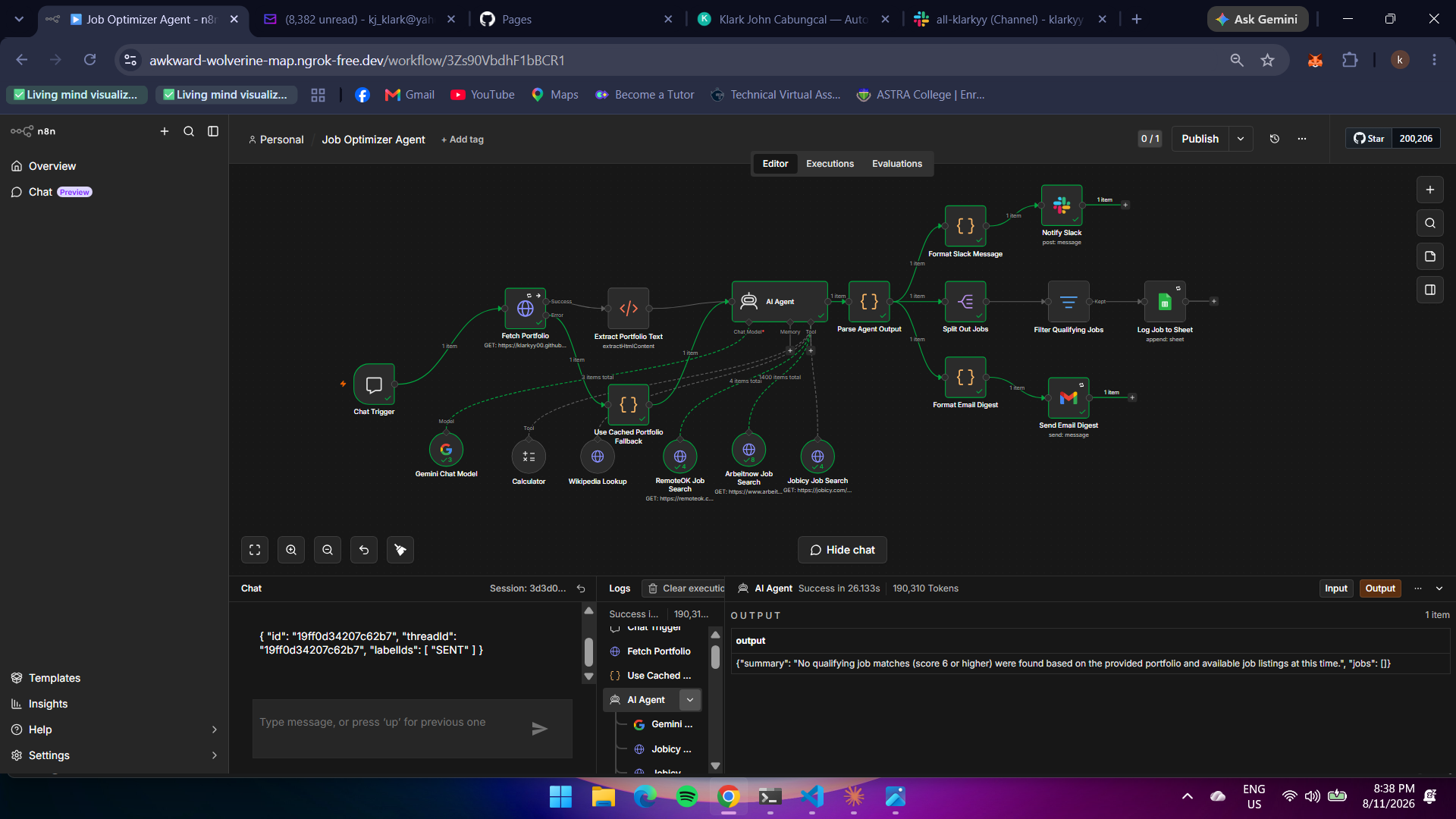
An autonomous AI agent that reads a portfolio site, searches three job boards in parallel, scores every listing against real skills and experience, and delivers only genuine matches — logged, Slacked, and emailed with no human in the loop.

  • Trigger — Chat Trigger: A single message ("run the job search") kicks off the whole pipeline on demand.
  • Fetch Portfolio (with fallback): Pulls the live portfolio page's HTML. If the site can't be reached, the workflow automatically falls back to a cached snapshot instead of failing the run — a flaky network call never blocks the search.
  • Extract Portfolio Text: Strips the HTML down to clean body text — the raw material the AI reads to infer skills, roles, and seniority.
  • AI Agent (Gemini 2.5 Flash): Reads the portfolio text and decides, on its own, which 2–4 job titles/keywords genuinely match the person's actual skills — no hardcoded search terms, no manual keyword list.
  • Tool calls — RemoteOK / Arbeitnow / Jobicy: The agent independently queries three separate job-board APIs as native HTTP Request tools, choosing tags, location, and region filters itself through structured tool parameters.
  • Tool call — Wikipedia Lookup: Available if the agent needs to fact-check a company or industry it's unsure about.
  • Scoring & filtering: Every candidate job gets a 1–10 match score and a one-sentence reason, generated by the agent itself. Only jobs scoring 6+ survive into the final output — weak matches get dropped, not padded in.
  • Parse & fan-out: The agent's JSON result is parsed, then split three ways in parallel — a Slack digest, a per-job Google Sheets log, and an HTML email summary.
  • Delivery: Slack notification to the team channel, one row per qualifying job appended to a tracking spreadsheet, and a formatted digest emailed via Gmail.
  • Zero manual searching — one message triggers a full multi-source search and evaluation
  • Fully self-contained — the agent, its tools, and all data-shaping logic live in a single workflow, no external sub-workflow dependencies to maintain
  • Resilient by design — a portfolio-fetch failure degrades gracefully to a cached fallback instead of breaking the run
  • Signal over noise — AI-driven scoring means only real matches ever reach Slack, the sheet, or the inbox
  • Full audit trail — every qualifying match lands in Google Sheets, so nothing's lost even if a Slack ping or email gets missed
n8nGemini AIHTTP Request Tools RemoteOKArbeitnowJobicy Google SheetsSlackGmail
n8n · Recruiting · AI Interview Scoring ✓ Real Client Project

Automated Recruiting Tracker & Interview Scoring

⌄

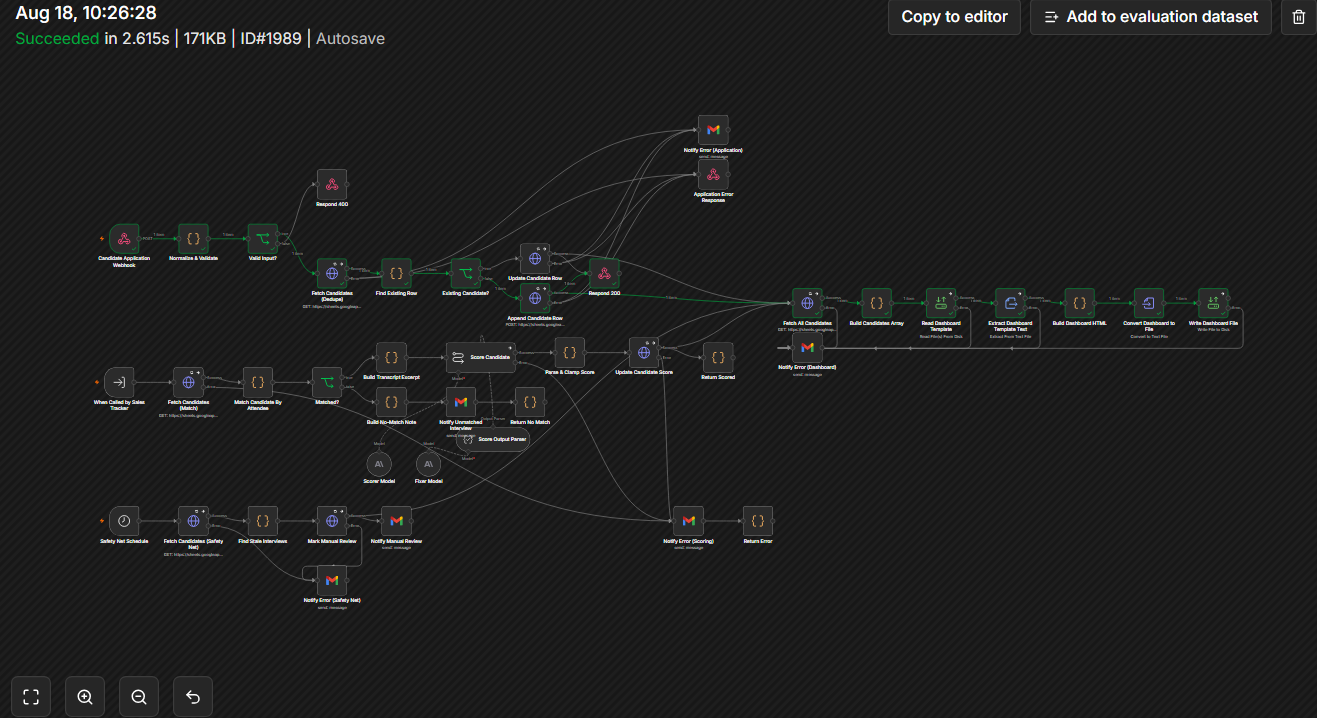
An automated hiring pipeline that replaces manual candidate spreadsheet-tracking and first-pass interview screening. It captures every application the moment someone applies, scores every interview against its transcript consistently, and gives a single live dashboard showing the whole pipeline at a glance.

  • 1. Application capture: A candidate applies via a Jotform application (name, email, role, source, resume). Within seconds they appear in the Candidates sheet and dashboard as "Applied" (or "Interview Scheduled" if a date was included) — fully automatic, zero manual entry.
  • 2. Interview conducted normally (Zoom/Meet with a Fireflies bot recording). Once Fireflies finishes transcribing, it reaches the same tracking workflow used for sales calls, which checks whether the transcript is an interview or a sales call and routes accordingly by matching the candidate's email — no manual step.
  • 3. AI interview scoring: Claude scores the interview against the transcript — a 1–10 score, a recommendation (Strong Yes / Yes / Maybe / No), strengths, concerns, and a summary — written back to the candidate's row automatically, flipping their stage to "Interviewed."
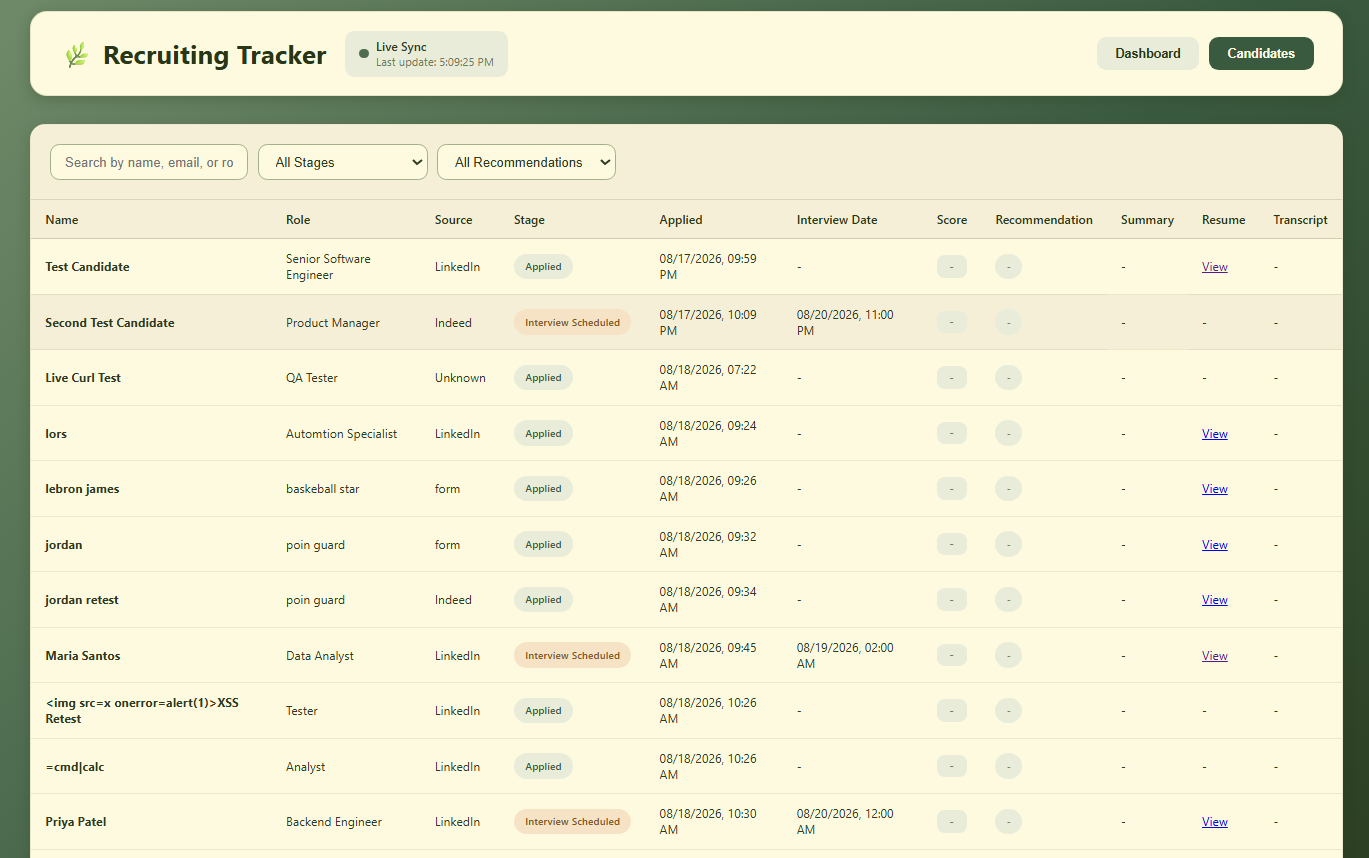
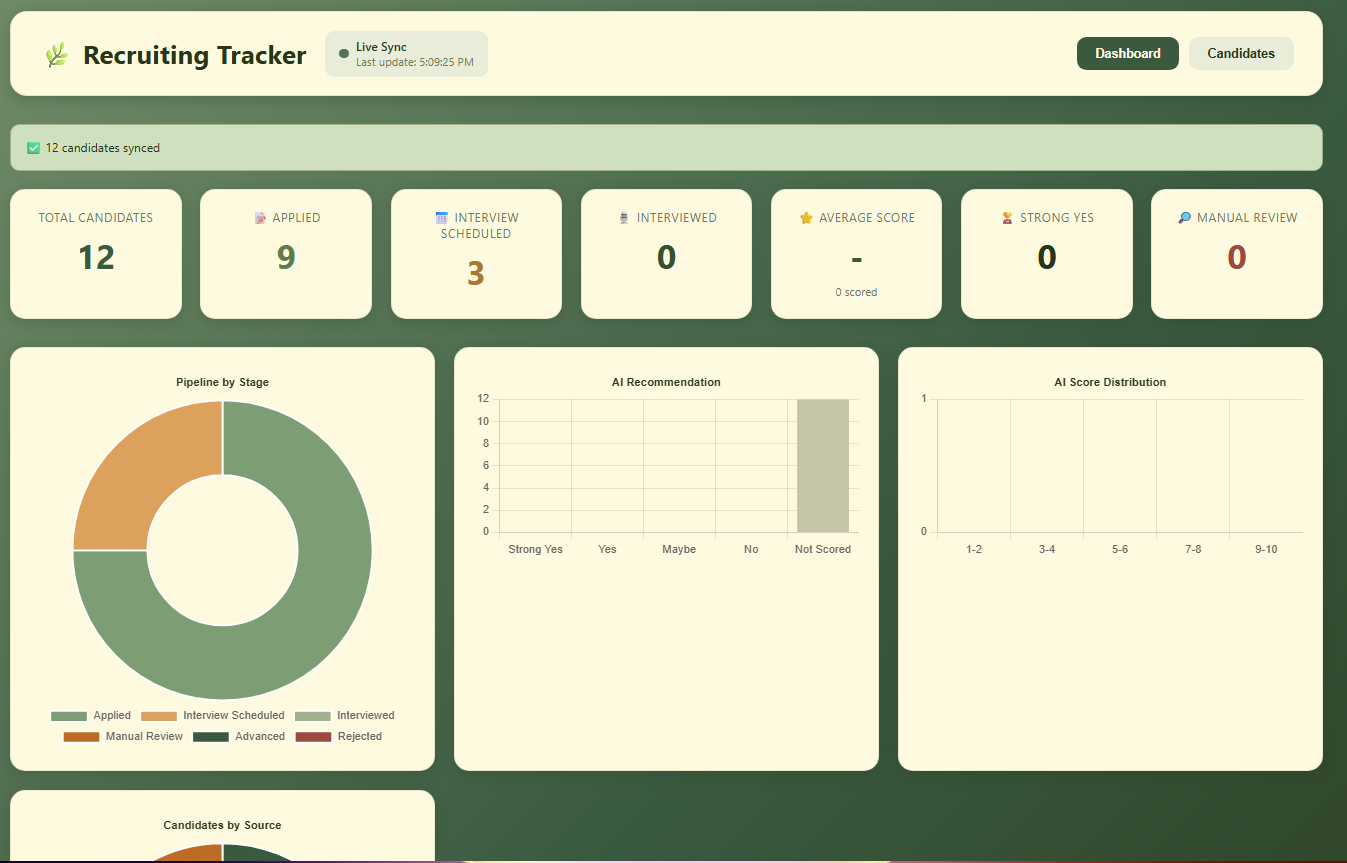
  • 4. Live dashboard: A two-tab dashboard (Pipeline overview + searchable Candidates table) rebuilds itself automatically on every change — filterable by stage or recommendation, searchable by name/email/role, with click-through to resumes and transcripts.
  • 5. Unattended safety net: Every 30 minutes, the system checks for any candidate whose interview happened over 24 hours ago with no matched transcript, flags them for Manual Review, and emails an alert — so a missed match never just quietly disappears.
  • Manually entering candidates into a spreadsheet
  • Re-listening to interviews to write a summary
  • Rebuilding or refreshing the pipeline dashboard by hand
  • Chasing down whether a transcript actually got matched to the right person
  • The AI produces a screening aid, not a hiring decision — a person still reads the score/summary and decides who advances
  • Scope boundary is deliberate: there's no automated offer/rejection flow past the "Interviewed" stage
n8nJotformFireflies Anthropic ClaudeGoogle SheetsLive HTML Dashboard
n8n · Lead Tracking · In Progress ✓ Real Client Project

Instagram DM Lead Tracking & Booking Matching

⌄

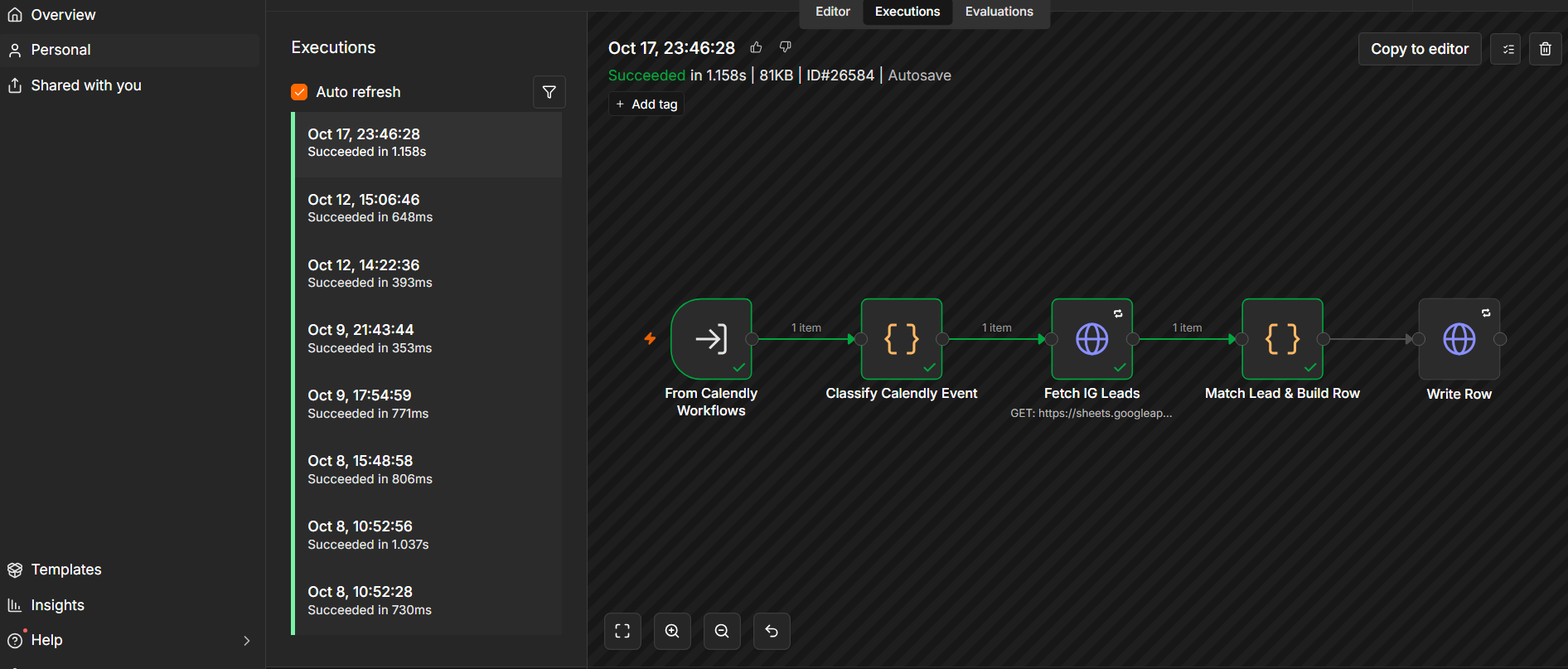
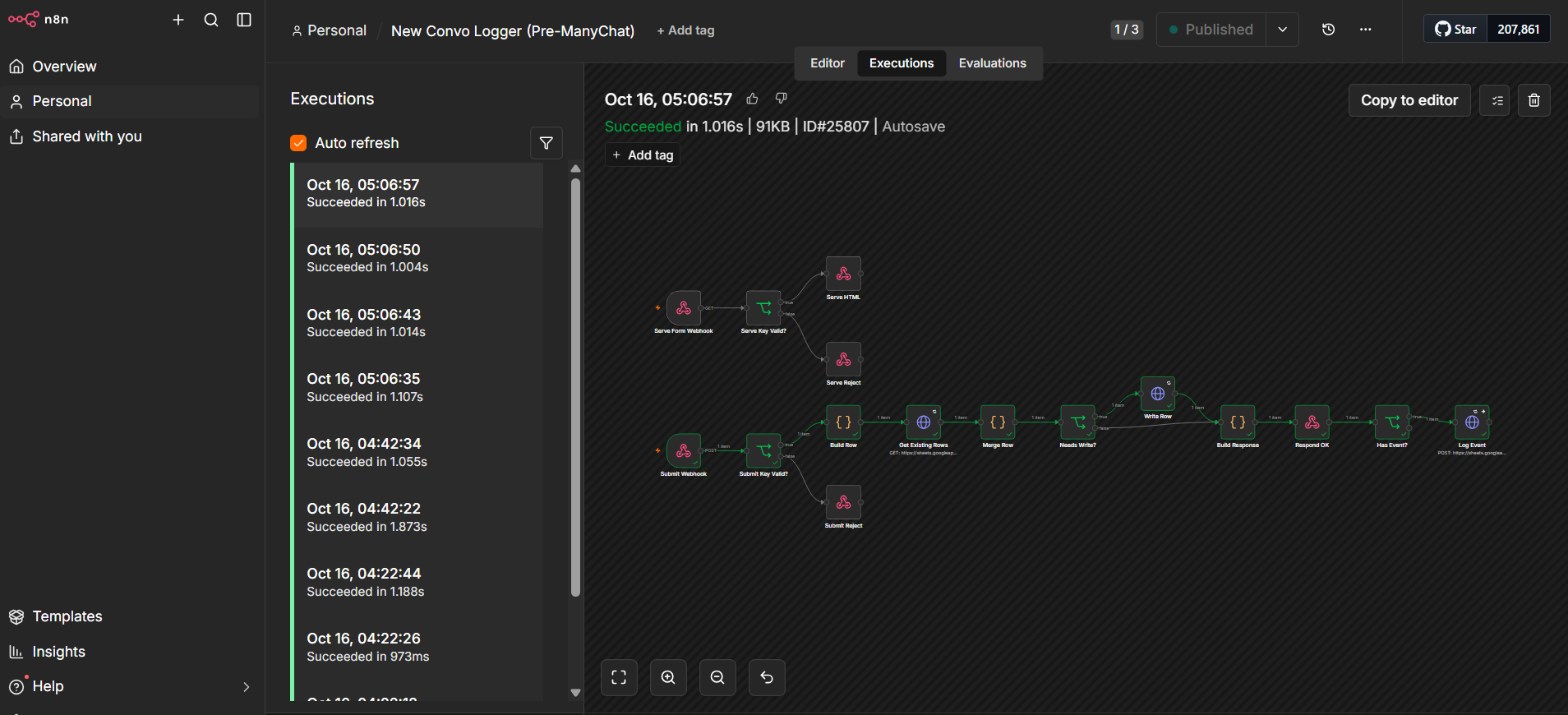
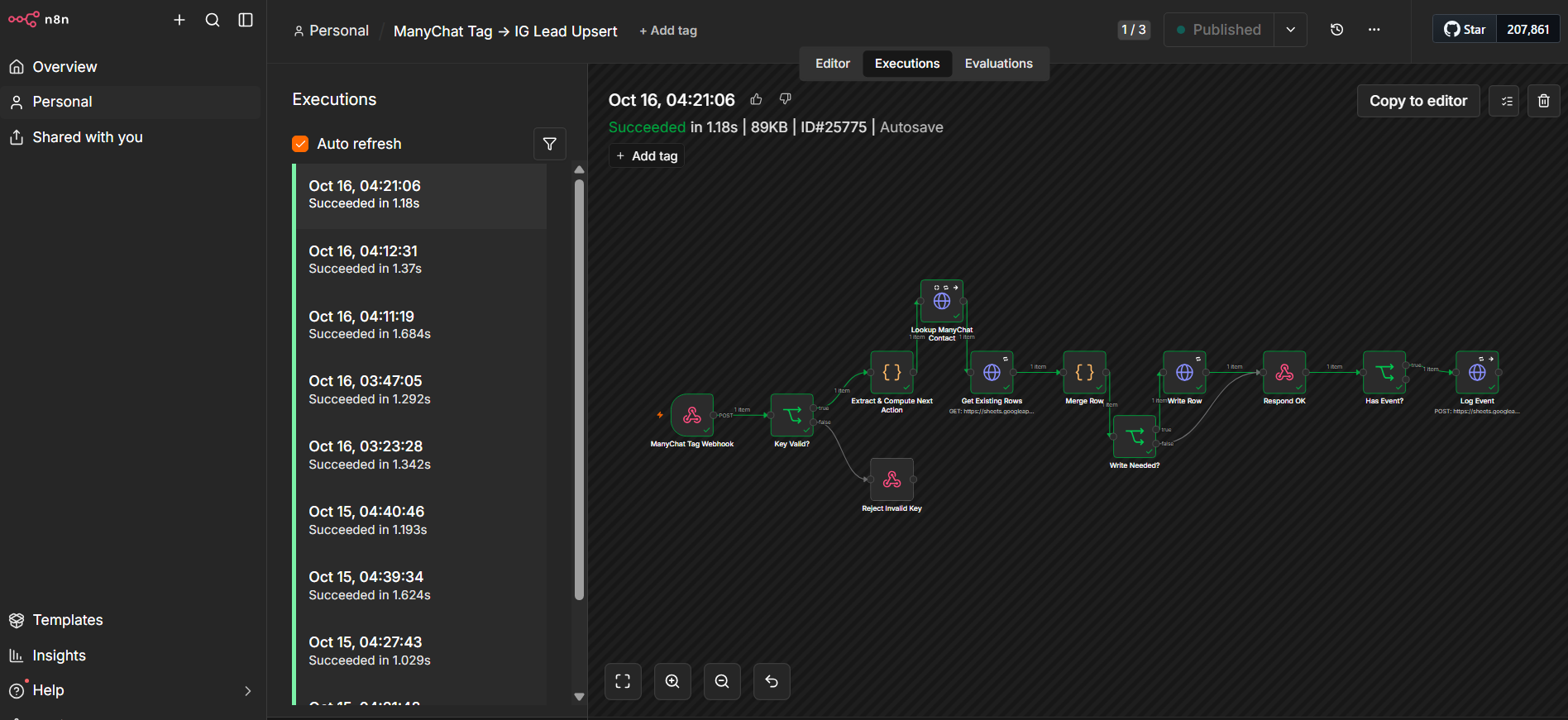
A real client project currently in progress — connecting Instagram DM conversations (via ManyChat) to a lead-tracking sheet, and matching those DM leads back to actual Calendly bookings, so a business can see the full path from "commented/DM'd" to "booked a call" in one place instead of two disconnected systems.

  • Lead-tracking sheet: The source of truth for captured DM leads.
  • ManyChat tag capture: Captures ManyChat tags and creates or updates the corresponding lead record automatically.
  • New conversation logger: Logs each new Instagram DM conversation as a lead record.
  • Calendly sync: Matches booked calls back to the original DM lead using the Instagram handle.
  • Follow-up and daily update workflows: Scheduled workflows that keep lead status current and surface leads needing follow-up.
  • Dashboard and reports: A live view of leads and reporting, rebuilt from the same lead sheet.
  • ManyChat automation build: Tags, a "setter" field, and the DM-side automations inside ManyChat itself.
  • Instagram Business connection: Linking the client's Instagram account to ManyChat so DM conversations flow into the system.
  • Booking-to-DM matching: Adding an "Instagram handle" field to the client's existing Calendly form (non-disruptive to the current form) so a booked call can be matched back to the original DM lead that generated it — closing the loop from first contact to booked appointment.
n8nManyChatInstagram Business API CalendlyGoogle Sheets
n8n · Customer Support · AI Triage

Support Inbox → AI Triage

⌄

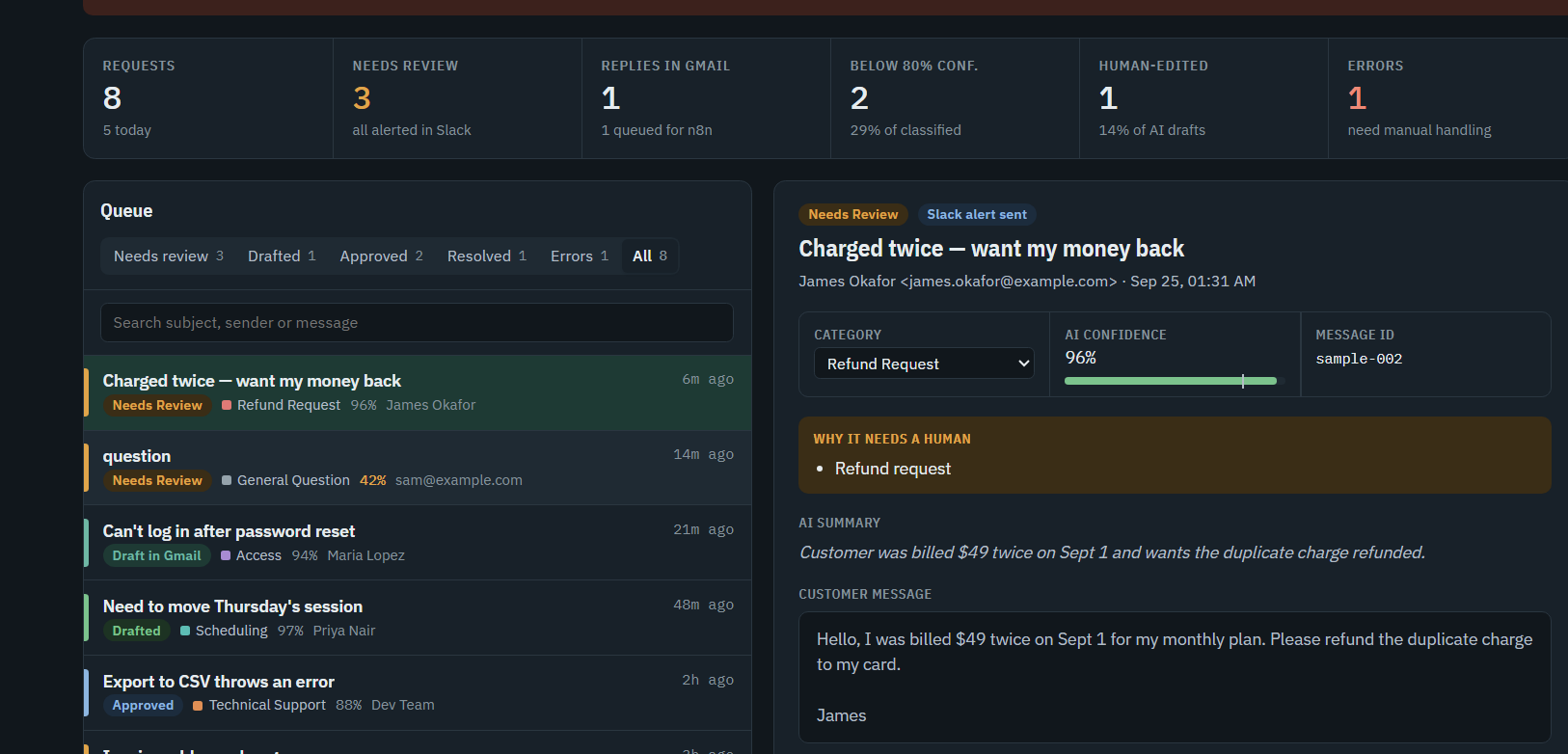
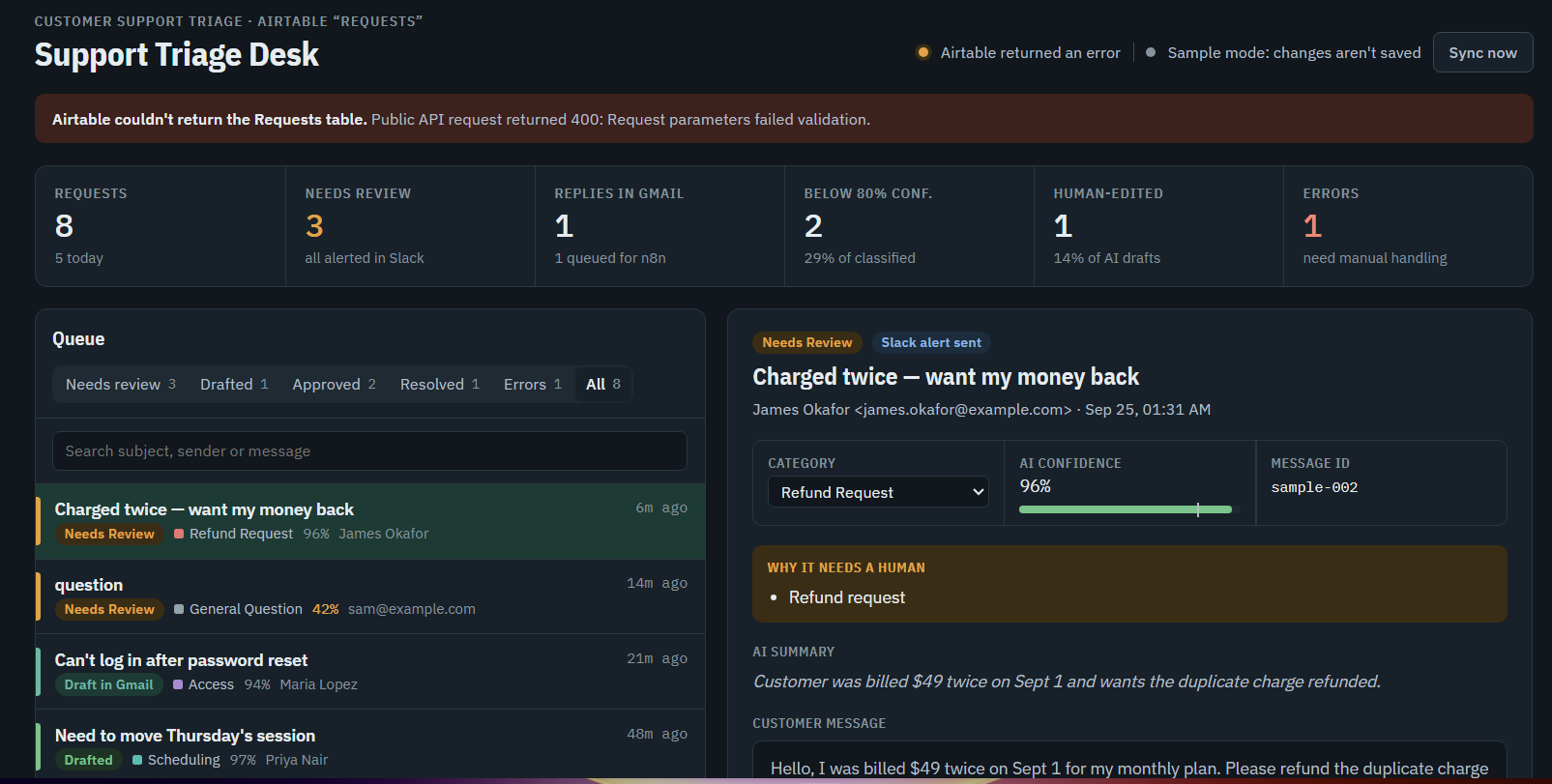
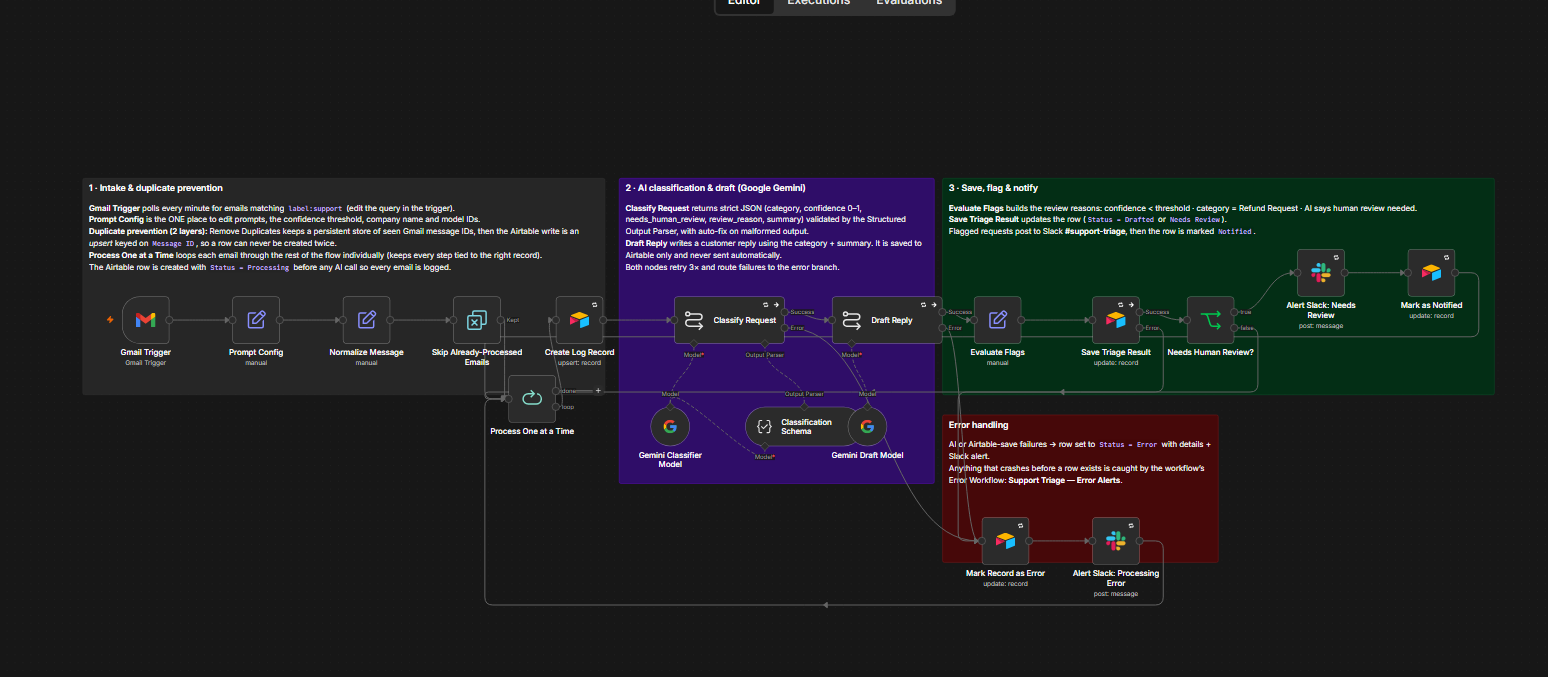
A three-workflow n8n system that reads incoming support email, classifies and drafts a reply with Gemini, and only ever sends after a human approves. Built and validated end-to-end — 3 workflows, 31 total nodes, Gemini 2.5 Flash, 0 errors / 0 warnings on validation, ~2 hours build time. Currently inactive pending go-live.

📧 Gmail Trigger→ 🧠 Classify (Gemini)→ ✍️ Draft reply (Gemini)→ 🗂 Log to Airtable→ 💬 Slack if flagged
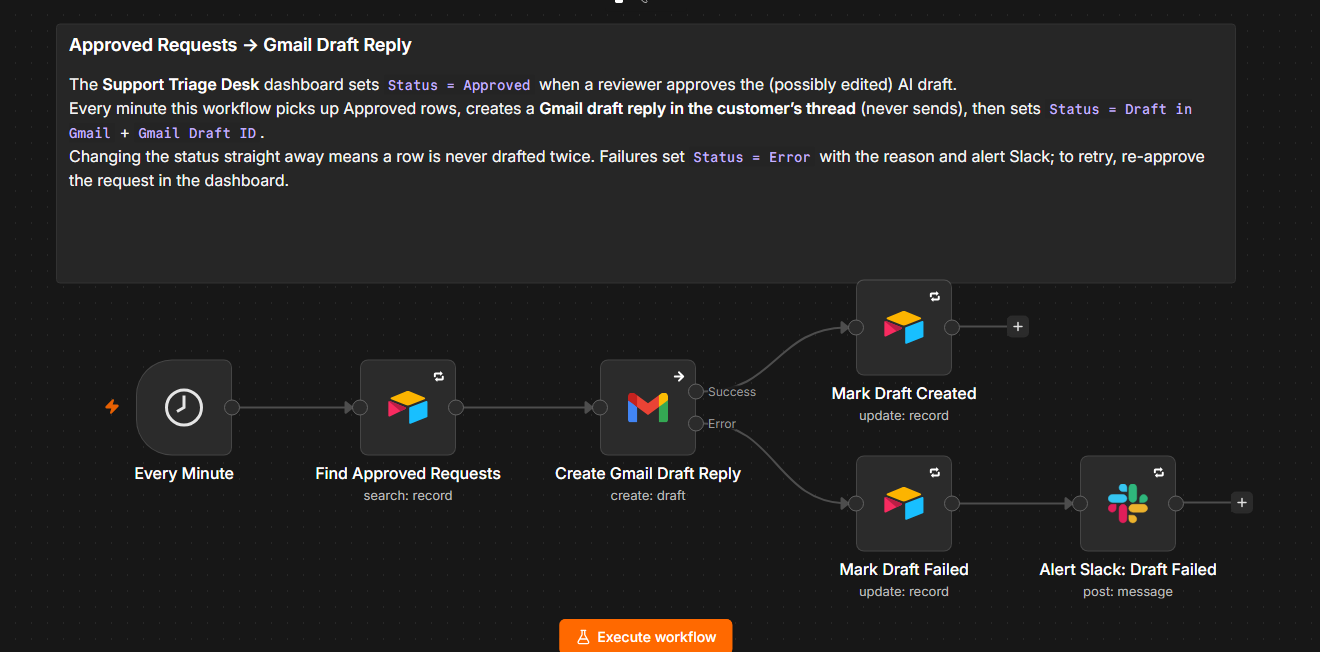
⏱ Every 1 min→ Find "Approved" rows→ Create Gmail draft→ Mark sent / failed
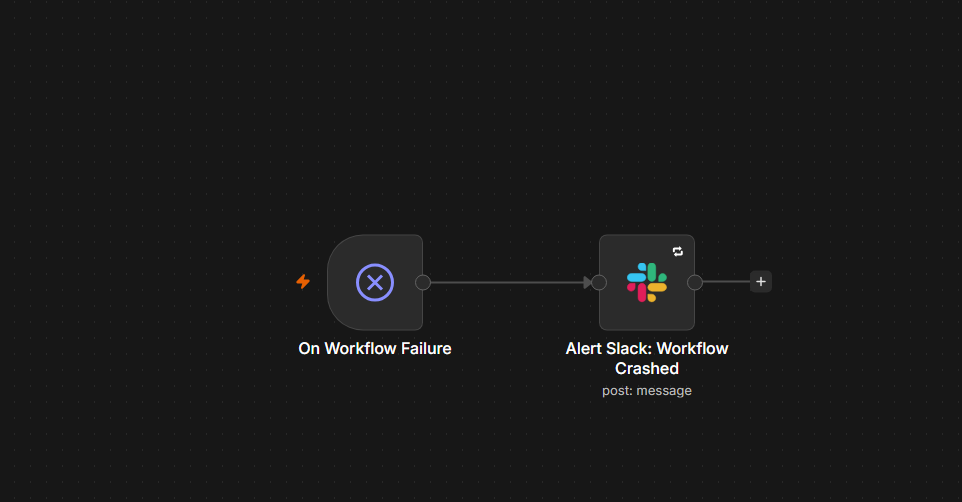
⚠️ Error Trigger→ Slack: workflow crashed
  • 1. Gmail Trigger fires on new inbox mail — a standard polling trigger, no webhook to expose or maintain.
  • 2. Prompt Config stamps every editable setting onto the item: which two Gemini models to use, the 0.8 confidence threshold, the company name/signature, and both full system prompts. Nothing below this node has a hard-coded prompt — everything reads from here.
  • 3. Normalize Message strips quoted reply chains, collapses whitespace, and caps the body at 8,000 characters before it reaches a model — also extracts a clean message ID, thread ID, sender info, and subject.
  • 4. Skip Already-Processed Emails de-duplicates on message ID against the last 10,000 items seen — across executions, not just within one run.
  • 5. Process One at a Time (batch size 1) isolates each email so one bad message can't take the rest of the batch down, and keeps Gemini calls well under rate limits.
  • 6. Create Log Record upserts an Airtable row at Status = Processing before any AI call runs — this is what makes crash-recovery work.
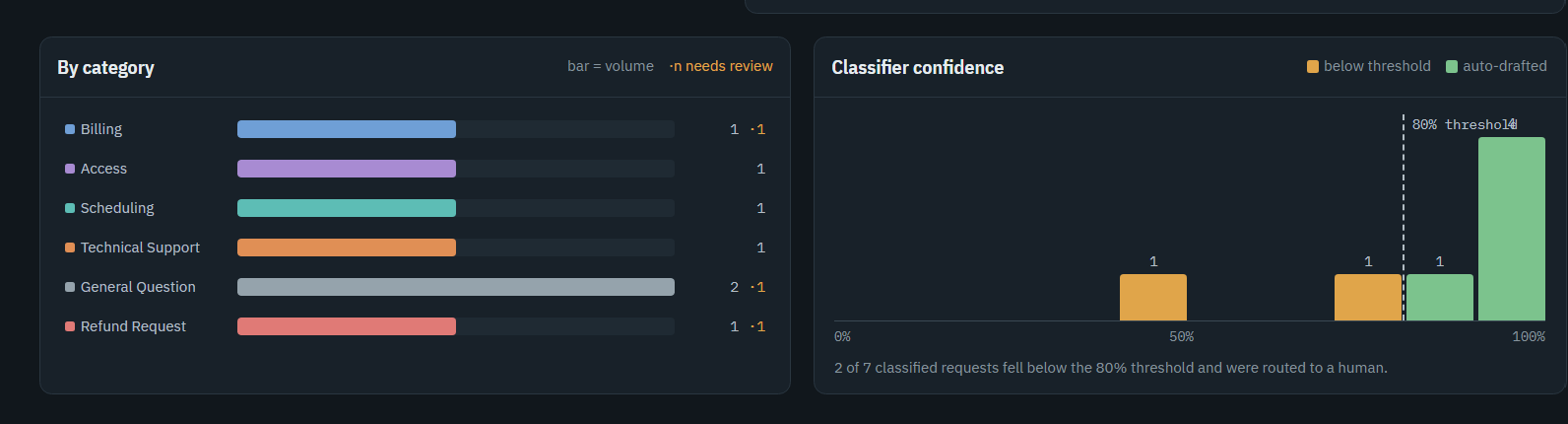
  • 7. Classify Request — Gemini 2.5 Flash at temperature 0, constrained by a structured-output schema (with auto-fix) to exactly one of 6 categories, a 0–1 confidence score, a boolean needs_human_review, a reason, and a one-line summary.
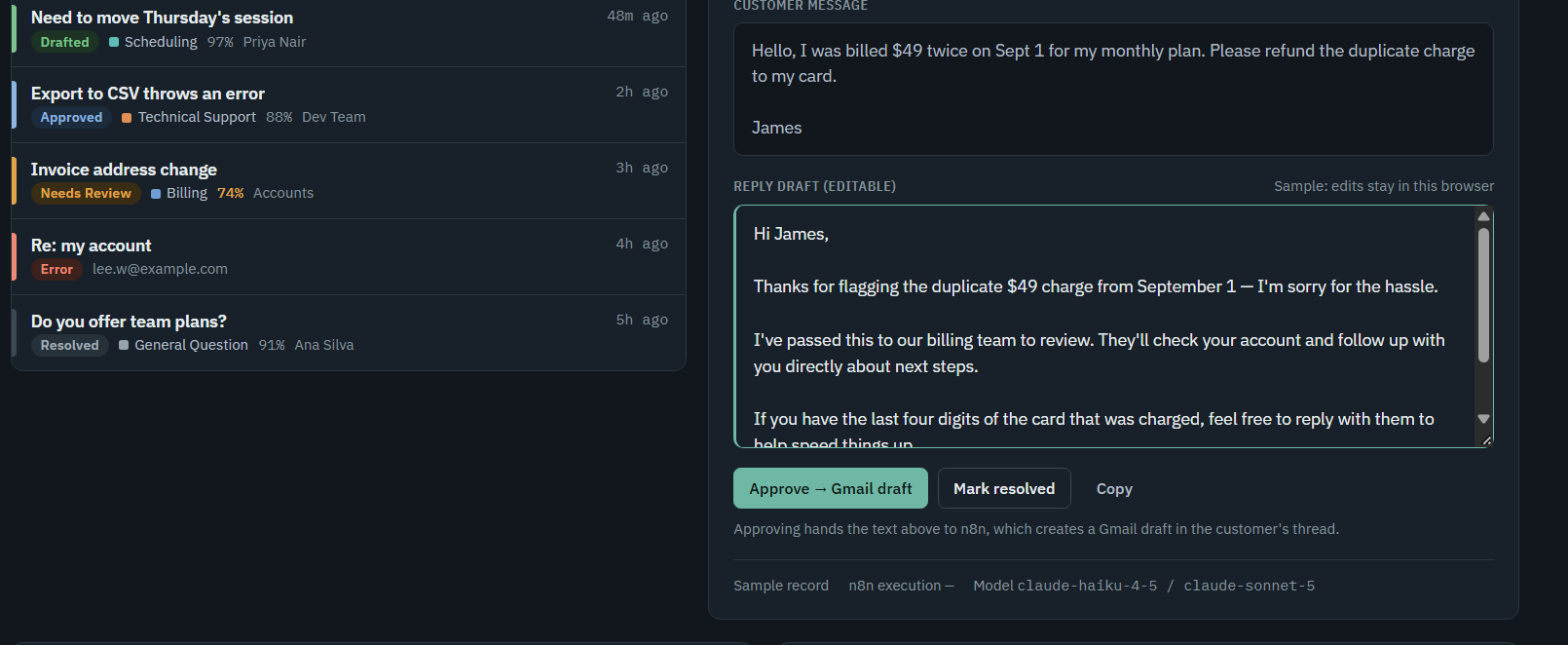
  • 8. Draft Reply — Gemini 2.5 Flash at temperature 0.4, writes the reply using the classification, the original email, and the editable signature.
  • 9. Evaluate Flags computes why (if at all) this needs a human: confidence below threshold, category is Refund Request, or the model's own needs_human_review.
  • 10. Save Triage Result writes category, confidence, summary, draft, and status back onto the same Airtable row.
  • 11. Branch on Needs Human Review? — flagged rows post to #support-triage in Slack with a deep link straight to the Airtable record; clean rows just loop to the next email.
  • 12. Separately, once a person sets a row's status to Approved in Airtable, a scheduled workflow (polling every minute) creates a real Gmail draft — never sends — and flips the row to "Draft in Gmail" so it can't be drafted twice.
  • 13. Independent of all of the above, a dedicated error-alert workflow sits on an Error Trigger and pings Slack with the workflow name, failed node, error, and execution link if the main workflow ever crashes outright.
  • Human-in-the-loop, not human-on-the-loop: the AI never sends anything. It proposes a category and a draft; a person approves in Airtable; only then does a real Gmail draft get created — and even that still needs a human to hit send.
  • Three workflows, three triggers: triage (event), drafting (schedule), and crash-alerting (failure) are different concerns on different clocks. Each can be tested, paused, or changed without touching the others.
  • One place to edit the AI: every model name, threshold, and prompt lives in a single Prompt Config node — a non-engineer can retune tone or swap models without opening an expression.
  • Structured output over free text: the classifier is contractually forced into 6 known categories with a numeric confidence, so routing logic reads real fields instead of parsing prose.
  • Two temperatures, two jobs: 0 for classification — repeatable, boring, correct. 0.4 for drafting — natural-sounding without wandering off the brand voice.
  • Airtable as the shared spine: one Status field that all three workflows read and write is the entire coordination mechanism — no queue, no extra database, easy for a human to audit by eye.
  • Duplicate / re-triggered emails: cross-execution dedup on message ID, plus the log write is an upsert keyed on the same field, so a re-run can't create a second row.
  • Low-confidence or ambiguous classification: anything under the 0.8 threshold routes to Needs Review regardless of category.
  • Refund requests: always routed to Needs Review, even at high confidence, because money leaving the business gets a standing human check.
  • Angry, legal, security, or churn-risk emails: the classifier prompt itself lists these as explicit needs_human_review triggers.
  • Long emails / quoted thread history: body is stripped of quoted replies and capped at 8,000 characters before it reaches the model.
  • Missing sender name: falls back to "unknown" rather than breaking the prompt template.
  • A single email fails AI or Airtable: retried 3× with backoff, then isolated — that one row is marked Error with the real error text and Slacked, while the batch-of-1 loop keeps going.
  • The whole workflow crashes (bad credential, n8n restart mid-run): the separate Error Trigger workflow still fires and pings Slack, catching what the per-item handling above can't.
  • Double-drafting an approved reply: the draft-sender flips status to "Draft in Gmail" the moment it succeeds, so the next minute's poll skips it.
  • Swap the placeholder identity for the real client's name and signature — a one-field change in Prompt Config.
  • Calibrate the 0.8 confidence threshold and the 6-category taxonomy against a batch of real historical tickets instead of intuition.
  • Build a small labeled eval set for the classifier so future prompt or model changes are regression-tested, not eyeballed.
  • Make replies thread-aware — a reply on an existing thread currently opens a brand-new logged request instead of linking back via thread ID.
  • Move the draft-sender off a 1-minute poll onto an Airtable-automation webhook, so approved replies go out the moment they're approved.
  • Add a fallback model or provider for the two Gemini calls so a provider outage doesn't stall the inbox.
  • At real ticket volume, weigh Airtable-as-system-of-record against a dedicated helpdesk tool for SLAs and multi-agent assignment.
n8nGemini 2.5 FlashGmail API AirtableSlack

Book a Free 30-Min Call

Let's talk through what you need automated — no pressure, just a quick conversation about your process and whether I'm a good fit to help.

Let's Collaborate

Ready to automate your business? Get in touch and let's discuss your project.